
Thermal Management, Internal Cleaning, and Performance Preservation
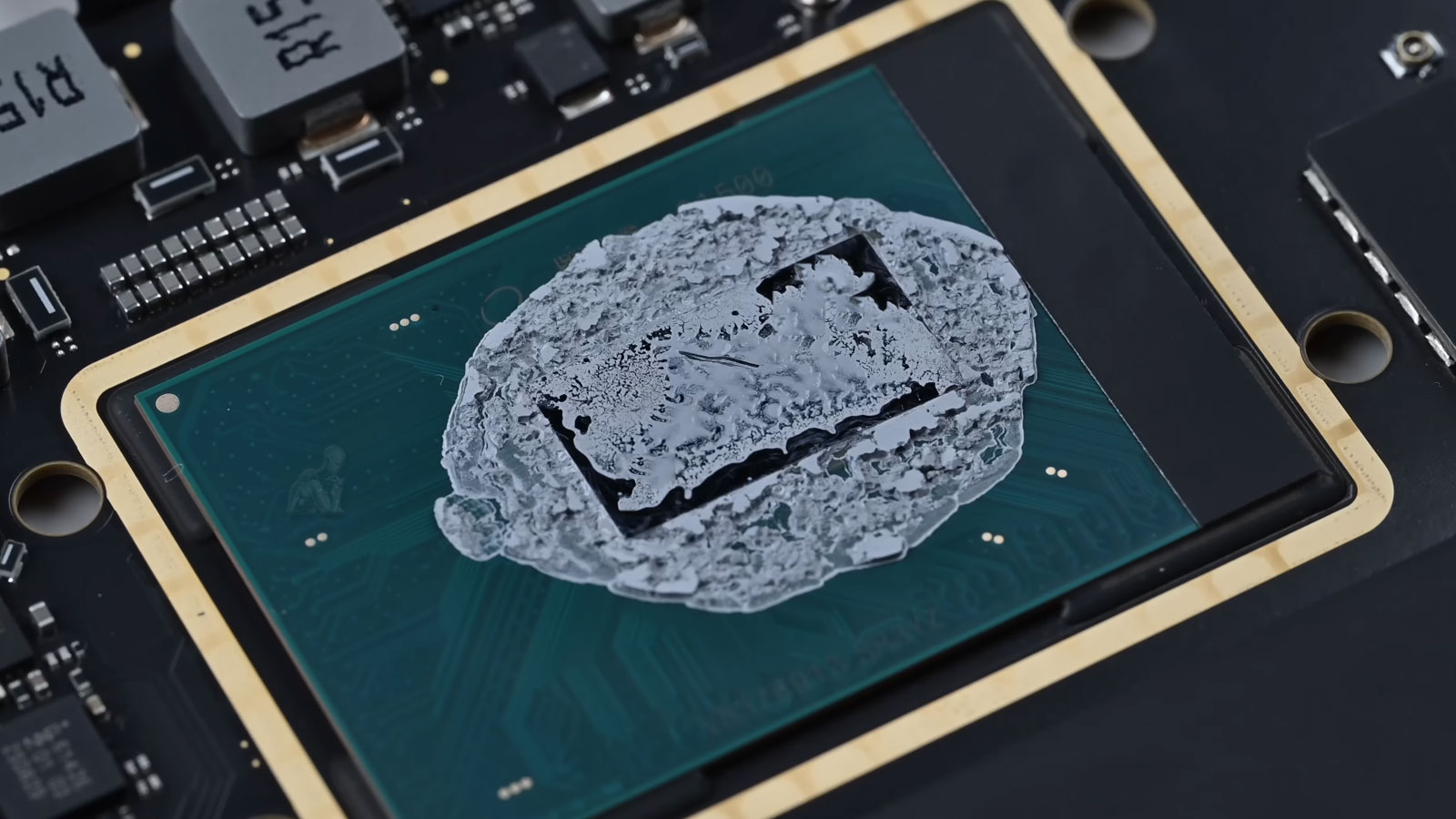
Thermal management within a MacBook Pro is directly tied to the efficiency of its internal cooling system and the condition of heat transfer materials. Over time, thermal paste can degrade, losing its ability to conduct heat effectively between the processor and the heatsink. This results in elevated operating temperatures, reduced performance under load, and increased stress on critical components. Addressing these conditions requires precise removal of degraded compounds and careful application of new thermal interface material to restore optimal heat dissipation.
Internal cleaning complements thermal restoration by eliminating accumulated dust and debris that can obstruct airflow and impair cooling efficiency. Contaminants within the fan assembly, heatsink fins, and ventilation pathways can significantly reduce the system’s ability to regulate temperature. By restoring clean airflow channels and ensuring proper thermal contact, the system can maintain stable operating conditions. This approach supports sustained performance, reduces thermal strain, and contributes to the long-term preservation of internal components.
What Cleaning and Maintenance Addresses
Routine service is recommended when a MacBook Pro shows:
- Excessive fan noise during light or moderate use
- Higher than normal operating temperatures
- Thermal throttling and performance drops
- Slow system response despite adequate hardware
- Dust buildup affecting vents or airflow
- Aging thermal compound reducing heat transfer
These conditions, if ignored, can shorten component lifespan and lead to preventable repairs.
Fan Assembly Efficiency and Airflow Restoration
The cooling performance of a MacBook Pro depends heavily on the efficiency of its fan assembly and the unobstructed movement of air through the internal chassis. Over time, dust accumulation and particulate buildup can impair fan blade balance, reduce rotational efficiency, and restrict airflow across critical heat-generating components. These conditions can lead to increased fan noise, reduced cooling effectiveness, and elevated system temperatures under normal operation.
Restoring airflow involves a detailed cleaning of fan assemblies, ventilation pathways, and heatsink structures to ensure that air can circulate freely and consistently. By reestablishing proper airflow dynamics, the system can maintain stable thermal conditions, allowing components to operate within their intended temperature ranges and reducing unnecessary strain during sustained workloads.
Contaminant Removal and Electrical Surface Protection
Internal exposure to dust, oils, and environmental contaminants can gradually affect the integrity of sensitive electronic surfaces. These substances may accumulate on connectors, circuit traces, and component interfaces, introducing potential interference with electrical conductivity and long-term reliability. Even minimal contamination can alter contact quality, leading to intermittent behavior or degradation over time.
Maintenance Scope and Procedure
Cleaning begins with careful internal access to remove accumulated dust from fans, vents, heatsinks, and surrounding components. Thermal compound on the processor and graphics system is evaluated and replaced when degraded to restore efficient heat dissipation.
System-level maintenance includes verification of fan behavior, temperature stability, and removal of unnecessary background load that contributes to heat buildup. The goal is not cosmetic cleaning but long-term operational stability.
Supported MacBook Pro Models
Cleaning and maintenance applies to all MacBook Pro generations, including:
- Intel-based MacBook Pro models
- Apple Silicon systems including M1 and M2
- 13-inch, 14-inch, and 16-inch configurations
- Retina display and Touch Bar variants
- Systems using MagSafe, USB-C, or Thunderbolt power
Each model is serviced according to its internal cooling architecture and thermal design.
Post-Maintenance Performance Verification
After cleaning and thermal restoration are completed, the system undergoes a structured evaluation to confirm that performance improvements have been successfully achieved. This includes monitoring temperature behavior, fan response, and overall system stability under varying conditions. The objective is to verify that thermal efficiency has been restored and that no residual issues remain within the cooling system or internal components.
Performance verification also provides insight into how the system will behave over extended use, ensuring that the benefits of maintenance are sustained beyond initial operation. By validating these outcomes, the process confirms that the MacBook Pro is operating within optimal parameters, supporting consistent performance and long-term reliability.
Thermal stress is one of the primary causes of logic board degradation, fan failure, and unexpected shutdowns. Regular maintenance reduces strain on internal components, preserves consistent performance, and helps avoid unnecessary part replacement. For convenience, pickup and return delivery can be arranged within Miami-Dade County when needed.