
Wireless Connectivity Diagnostics and Repair
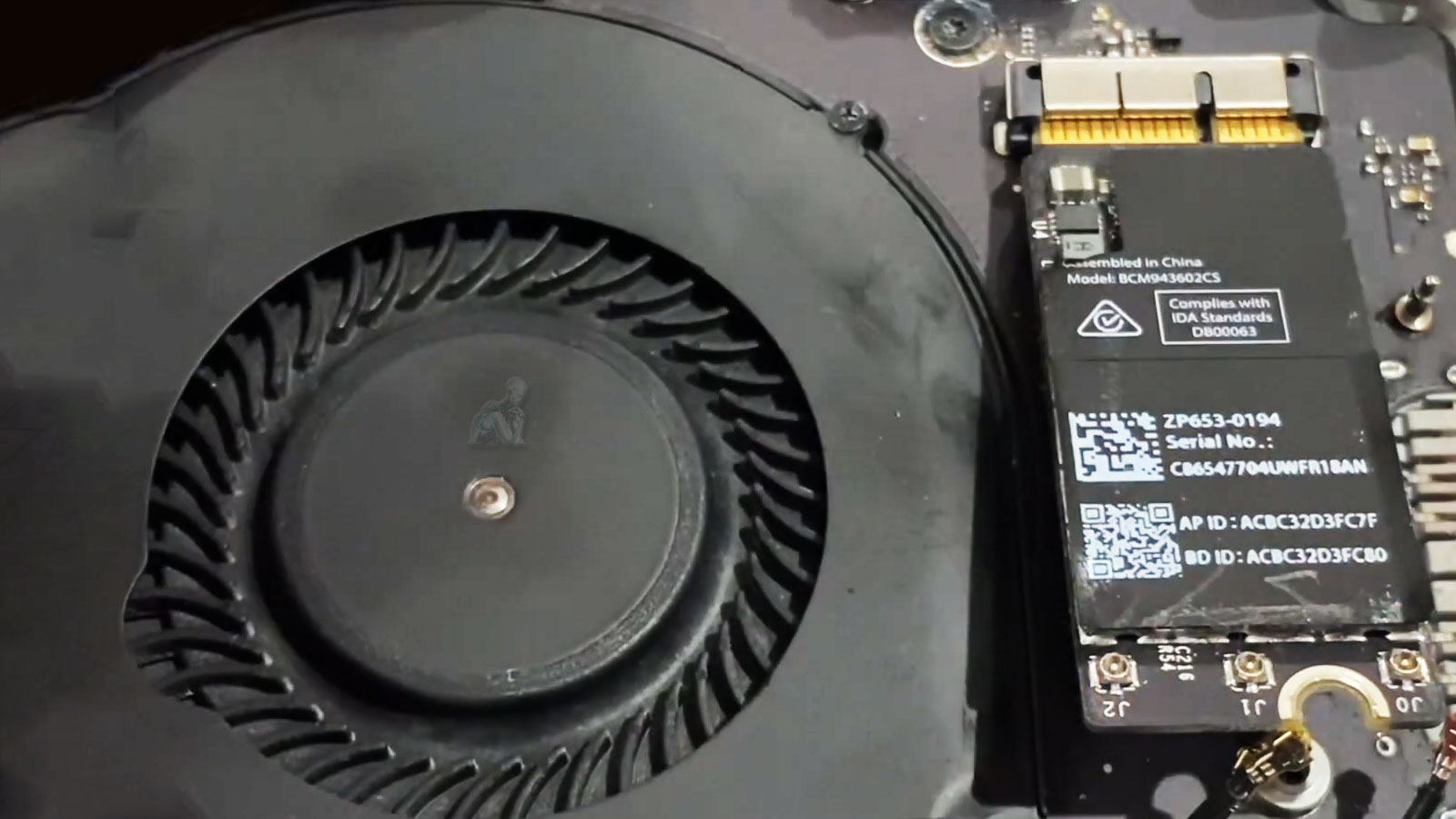
Wireless performance on a MacBook Pro depends on coordinated operation between the Wi-Fi module, antenna assembly, and system-level network management. Issues such as unstable connections, limited range, or failure to detect available networks can originate from disruptions at any point within this chain. Accurate diagnosis requires evaluating how the wireless hardware responds under varying signal conditions, as well as confirming that communication between the Wi-Fi card and the logic board remains consistent and uninterrupted.
Repair efforts focus on restoring reliable signal acquisition and transmission by addressing faults within the wireless hardware or its supporting connections. This may involve resolving connection instability at the Wi-Fi module, correcting antenna-related issues, or ensuring that the network interface operates within expected parameters. Each step is approached with attention to maintaining consistent connectivity, allowing the system to sustain stable wireless performance across different environments and usage conditions.
Common Wi-Fi and Wireless Symptoms
Wi-Fi networks not appearing
Connection drops during normal use
Very weak signal even near the router
Extremely slow internet speeds on a known fast network
Wi-Fi marked as unavailable or disabled
System reporting missing wireless hardware
Bluetooth or AirDrop also failing to function
Many of these symptoms originate from shared wireless components inside the MacBook Pro.
Repair and Correction Methods
Software and Configuration Correction
Network settings, system profiles, and firmware parameters are reviewed and corrected when the issue is software based.
Antenna and Signal Path Repair
Damaged or disconnected antenna components can severely reduce signal strength and stability. These are repaired or replaced as needed.
Wireless Hardware Replacement
If the internal Wi-Fi module has failed, it is replaced with a model-specific component designed for the exact MacBook Pro configuration.
Board-Level Repair (When Applicable)
On models where the wireless chipset is integrated into the logic board, repair may involve precision board-level work depending on failure type and feasibility.
Signal Range, Interference, and Environmental Factors
Wireless connectivity is influenced not only by internal hardware but also by the surrounding environment in which the MacBook Pro operates. Signal strength can vary based on distance from the access point, physical obstructions, and the presence of competing wireless networks. In dense environments, overlapping channels and electromagnetic interference can introduce instability that may resemble hardware-related faults.
Understanding how these external factors interact with the system helps distinguish between environmental limitations and internal connectivity issues. Evaluating performance across different locations and network conditions provides insight into whether the problem is related to signal reception, transmission quality, or broader network congestion. This perspective ensures that wireless behavior is interpreted accurately before determining the appropriate corrective action.
How Wi-Fi Issues Are Diagnosed
Wireless problems can stem from several layers of the system. The diagnostic process examines:
Wireless card functionality
Internal antenna cables and signal routing
macOS network configuration and system profiles
Firmware and low-level controller behavior
Logic board communication with wireless components
This ensures the issue is identified correctly before any repair is performed.
Supported MacBook Pro Models
Intel-based MacBook Pro systems
Apple Silicon MacBook Pro models
Retina and Touch Bar configurations
13-inch, 14-inch, 15-inch, and 16-inch variants
Wireless architecture varies by generation, and repair options are matched accordingly.
Internal Antenna Pathways and Hardware Integration
The effectiveness of wireless connectivity depends heavily on the integrity of the internal antenna system and its connection to the Wi-Fi module. Antenna pathways are routed through the display assembly and hinge structure, making them sensitive to wear, alignment changes, and physical stress over time. Disruptions within these pathways can reduce signal strength or introduce inconsistencies in data transmission.
Proper integration between the Wi-Fi card and antenna system ensures that signals are transmitted and received without degradation. Any irregularity in these connections can affect both range and stability, even if the wireless module itself remains functional. Maintaining the integrity of these internal pathways is essential for achieving consistent connectivity across different usage conditions.
Connection Stability and Long-Term Wireless Performance
Reliable wireless performance is defined by the system’s ability to maintain a consistent connection over extended periods of use. Frequent disconnections, fluctuating speeds, or delayed network response can indicate instability within the wireless subsystem. These conditions may not always be constant, but they can affect productivity and overall system usability when they occur unpredictably.
If your MacBook Pro is struggling to maintain a stable wireless connection, taking action at this stage can prevent ongoing interruptions and inconsistent performance. You can call to speak directly and describe what the system is doing in real time, especially if the issue appears intermittently or depends on location and signal strength. For situations where you prefer to document the behavior, the request form can be used to outline connection drops, limited range, or failure to detect networks.
Wireless issues often vary depending on usage conditions, making clear details an important part of defining the next step. Information such as when the problem occurs, how frequently it happens, and whether other networks behave differently helps narrow down the source of the fault. With that context, the path forward can be aligned with the actual performance of the system, ensuring that connectivity is restored in a stable and consistent way.