
Laptop Overheating Repair in Miami – Keep Your Laptop Cool and Stable
Maintaining proper thermal conditions is essential for the stable operation of any laptop, particularly as internal components generate heat during everyday use. When cooling systems become obstructed or less effective over time, temperatures can rise beyond optimal levels, affecting performance and overall system behavior. Issues such as dust accumulation, reduced airflow, and degraded thermal interfaces can all contribute to overheating, making careful evaluation necessary to determine the underlying cause.
Addressing overheating involves restoring the efficiency of the cooling system through detailed inspection and targeted maintenance. This includes ensuring that fans operate correctly, airflow pathways remain unobstructed, and heat is transferred effectively away from critical components. By stabilizing internal temperatures, the system can operate more consistently, reducing strain on hardware and supporting reliable performance over time.

Cooling System Inspection and Evaluation
A comprehensive inspection of the cooling system is essential to identify factors contributing to elevated temperatures. This process involves examining internal fans, heat sinks, and airflow channels to determine whether dust accumulation, mechanical wear, or airflow restrictions are present. Evaluating these components provides a clear understanding of how effectively heat is being managed within the system.
By identifying inefficiencies in the cooling pathway, it becomes possible to address the root cause of overheating rather than just its symptoms. This structured evaluation ensures that corrective actions are aligned with restoring proper thermal balance and consistent system operation.
Why Choose Our Laptop Overheating Repair Service
We focus on identifying the real cause of overheating and fixing it correctly.
- Certified Technicians experienced with laptop thermal systems
- Accurate Diagnostics to identify airflow, fan, or thermal issues
- Cooling System Expertise including cleaning, repair, and optimization
- Transparent Pricing with clear recommendations
- Repair Warranty for added confidence
- Local Service in Miami serving all of Miami-Dade County
Our Laptop Overheating Repair Services
We offer complete cooling and thermal management solutions.
- Internal cleaning and dust removal to restore proper airflow
- Thermal paste replacement using high-quality compounds
- Fan repair or replacement for noisy or failed cooling fans
- Heat sink and cooling system optimization
- Temperature monitoring and system tuning
- Cooling-related hardware upgrades when needed
Performance Stability After Cooling Service
Once the cooling system has been restored, verifying stable performance is an important final step. This includes monitoring temperature behavior, ensuring that fans respond appropriately to system load, and confirming that heat is being dissipated consistently across key components.
Stable thermal conditions support reliable operation and reduce the risk of performance fluctuations. By confirming that the system maintains balanced temperatures, the laptop is better prepared for sustained use without the interruptions commonly associated with overheating.
Thermal Interface Restoration
Thermal interfaces play a critical role in transferring heat away from processors and graphics components. Over time, thermal paste can dry out and lose its effectiveness, while thermal pads may degrade or shift from their intended position. These changes reduce heat transfer efficiency and contribute to rising internal temperatures.
Restoring these interfaces involves carefully removing degraded materials and applying new thermal compounds with proper alignment. Ensuring optimal contact between components and cooling elements supports efficient heat dissipation and helps maintain stable operating conditions.
Airflow Optimization and Dust Removal
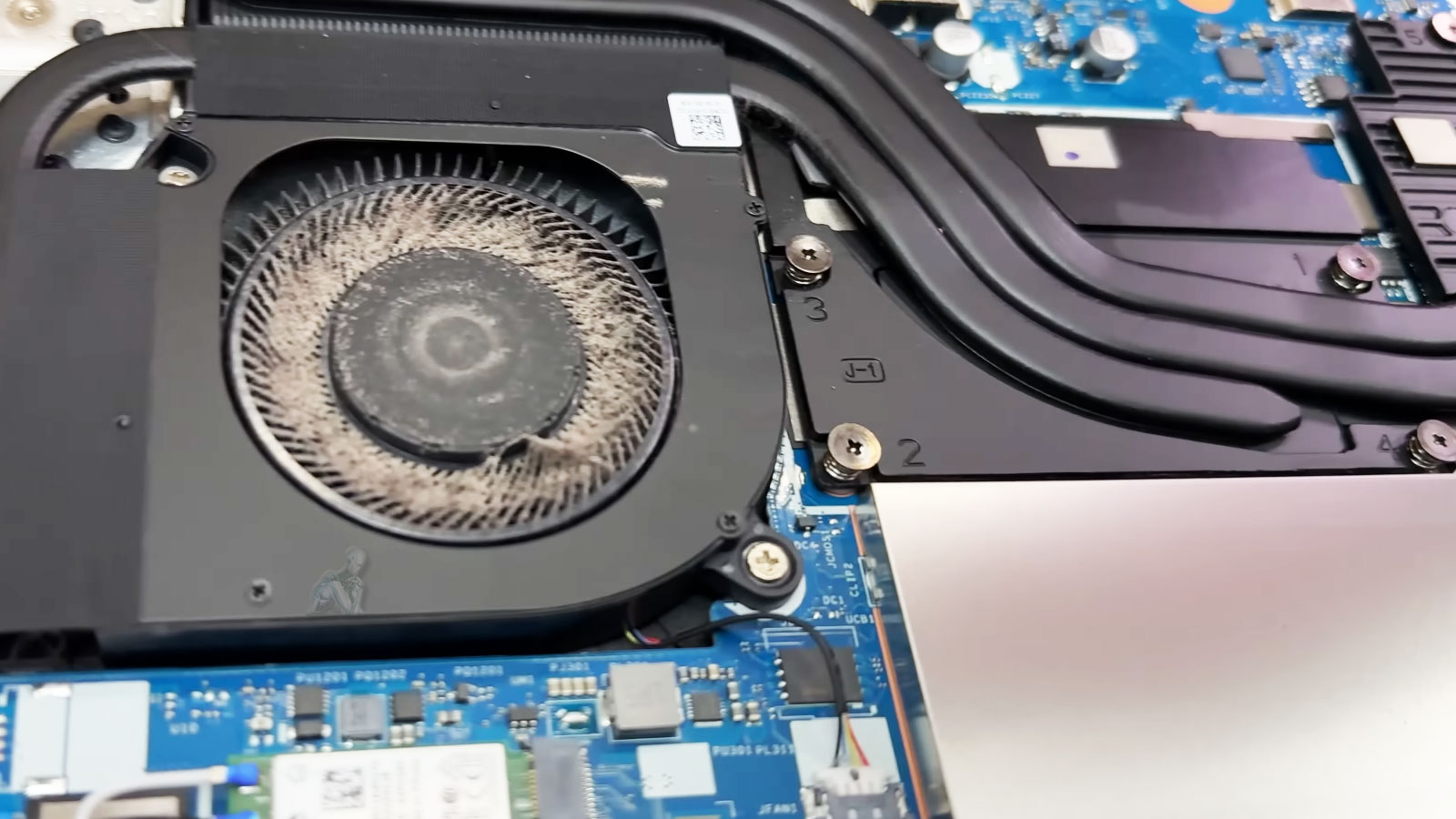
Proper airflow is necessary to maintain consistent cooling performance throughout the laptop. Dust buildup within vents, fans, and internal pathways can significantly restrict air movement, leading to localized heat accumulation. Addressing these obstructions is a key part of restoring effective cooling.
Cleaning and optimizing airflow pathways allow the system to regulate temperature more efficiently. By removing contaminants and ensuring unobstructed circulation, the cooling system can function as intended, reducing the likelihood of overheating under normal usage conditions.
Common Laptop Overheating Issues We Fix
- Laptop becoming extremely hot during normal use
- Sudden shutdowns or restarts caused by thermal protection
- Loud or constantly running cooling fans
- Performance throttling and slowdowns due to heat
- Dust buildup blocking vents and airflow
- Dried or degraded thermal paste on CPU or GPU
How the Repair Process Works
- Thermal Evaluation – We measure temperatures and inspect cooling components
- Diagnosis & Recommendation – You receive a clear explanation of the issue
- Cooling System Service – Cleaning, repair, or optimization is performed
- Final Testing – Temperatures and performance are verified under load
Overheating does not have to shorten your laptop’s lifespan. With proper maintenance and cooling repair, your device can run quieter, faster, and more reliably. If you need dependable laptop overheating repair in Miami, we’re ready to help. Cooler operation. Better performance. Long-term reliability.