• Home |
  • SITEMAP
Computer Repair Miamis logo
  • DESKTOP
    • Desktop Data Recovery
  • LAPTOP
    • LAPTOP DATA RECOVERY
  • MAC REPAIR
    • MAC DATA RECOVERY
    • iPHONE
  • Services
  • Areas we Serve
  • BLOG
  • CONTACT US
    • SITEMAP
    • FREE DELIVERY
  • Home
  • » Mac Services » MacBook Air Hard Drive Replacement

MacBook Air Hard Drive Replacement

Improving Speed, Reliability, and Storage Capacity

When a MacBook Air becomes slow, unresponsive, or unable to boot, the internal storage is often the root cause. Aging drives, limited capacity, or failing solid state storage can severely impact system performance and stability.

This service focuses on restoring reliability and improving performance through proper storage evaluation, replacement, or upgrade, based on the exact MacBook Air model and its technical limitations.


Signs the Internal Drive May Need Replacement

Storage related issues often present as:

  • Long startup times or delayed application launches
  • Frequent freezing or system crashes
  • Disk Utility reporting errors or SMART warnings
  • macOS failing to load or stalling during startup
  • Persistent “startup disk full” messages
  • Corrupted files or repeated application failures

Addressing these symptoms early can prevent permanent data loss and extend the usable life of the system.


Drive Replacement and Upgrade Process

Storage Evaluation

The existing drive is assessed to confirm failure, degradation, or capacity limitations. Model compatibility is verified before any recommendation is made.

SSD Installation or Replacement

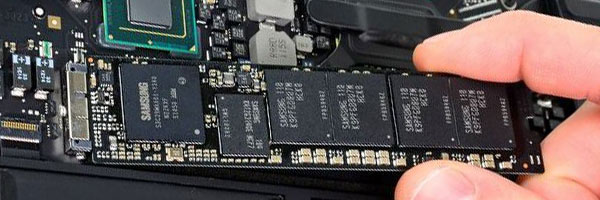
Where supported, a new solid state drive is installed to improve speed, reduce heat, and increase long term reliability. Drive type and capacity are selected based on the specific MacBook Air generation.

macOS Installation and Configuration

A clean installation of the latest compatible macOS is performed and optimized for the new storage device.

Data Transfer or Recovery Options

If the original drive is accessible, files, applications, and user settings can be transferred. When drives are partially failed, recovery options are evaluated before replacement.

Final Testing

The system is tested for stability, storage performance, and overall responsiveness before completion.


Storage Capacity Options

Common upgrade paths include:

  • 256 GB for basic daily use
  • 512 GB for work and multitasking environments
  • 1 TB or higher for media, development, or professional workloads

Capacity recommendations are based on current usage and expected future needs.


Supported MacBook Air Models

Service availability varies by generation:

  • Intel based MacBook Air systems with removable PCIe storage
  • Retina models with limited storage replacement paths
  • Apple Silicon models where storage diagnostics and data migration are possible

Each system is evaluated individually to determine the most appropriate solution.


Pickup and Delivery Availability

Pickup and return delivery can be arranged within Miami-Dade County when needed.


Schedule a Storage Evaluation

If your MacBook Air is slow, unstable, or running out of space, a professional storage evaluation can determine whether replacement or upgrade is appropriate.

Correcting storage issues restores speed, stability, and confidence in daily use while protecting important data.

Comments are closed.

Geek Corners

  • Detecting if your gaming laptop requires air cleaning maintenance April 12, 2025
  • The Best Practices for Building a Custom Gaming PC April 11, 2025
  • Mistakes to avoid when trying to repair a liquid damaged pc April 10, 2025
  • Enhance the performance of your gaming PC for streaming April 8, 2025
  • Identifying the causes of slow laptop performance April 6, 2025
  • Home Services April 4, 2025
  • Wiring Installation April 3, 2025
  • Security Cameras April 1, 2025
  • Wired and Wireless Network Mar 28, 2025
  • Data Recovery Mar 27, 2025
  • Game Console Diagnostic Mar 25, 2025
  • Drone Repairs Mar 23, 2025
  • Microsoldering Services Mar 22, 2025
  • Tablet Diagnostic Mar 21, 2025
  • iPhone Repairs Mar 20, 2025
  • Mac Pro Power Supply Repairs Mar 18, 2025
  • Mac Pro Data Transfer Mar 15, 2025
  • Mac Pro Data Recovery Mar 14, 2025
  • Mac Pro Software Configuration Mar 13, 2025
  • Mac Pro Logic Board Repairs Mar 12, 2025
  • Mac Pro Hardware Upgrades Mar 10, 2025
  • Mac Pro Video Repairs Mar 8, 2025
  • Mac Pro Hard Drive Replacement Mar 7, 2025
  • Mac Pro Cleaning and Maintenance Mar 4, 2025
  • Mac Pro Repair Diagnostic Mar 3, 2025
  • Desktop Computer Data Recovery Mar 2, 2025
  • Desktop Computer Data Transfer Mar 1, 2025
  • Desktop Computer Software Configuration Mar 1, 2025
  • Desktop Computer Hardware Upgrades Feb 27, 2025
  • Desktop Computer Motherboard Repairs Feb 25, 2025
  • Desktop Computer Hard Drive Replacement Feb 24, 2025
  • Desktop Computer Cleaning and Maintenance Feb 23, 2025
  • Desktop Computer Repair Diagnostic Feb 21, 2025
  • All-in-One Computer Data Recovery Feb 18, 2025
  • All-in-One Computer Data Transfer Feb 17, 2025
  • All-in-One Software Configuration Feb 16, 2025
  • All-in-One Computer Hardware Upgrades Feb 14, 2025
  • All-in-One Computer Motherboard Repairs Feb 13, 2025
  • All-in-One Computer Hard Drive Replacement Feb 11, 2025
  • All-in-One Computer Power Supply Repairs Feb 10, 2025
  • All-in-One Computer Cleaning and Maintenance Feb 9, 2025
  • All-in-One Computer Repair Diagnostic Feb 7, 2025
  • MacBook Air Data Transfer Feb 5, 2025
  • MacBook Air Software Configuration Feb 4, 2025
  • MacBook Air Data Recovery Feb 3, 2025
  • MacBook Air Liquid Damage Repairs Feb 2, 2025
  • MacBook Air Logic Board Repairs Feb 1, 2025
  • MacBook Air Trackpad Repairs Jan 25, 2025
  • MacBook Air DC Jack Repairs Jan 24, 2025
  • MacBook Air Hard Drive Replacement Jan 23, 2025
  • MacBook Air Battery Replacement Jan 22, 2025
  • MacBook Air Keyboard Repairs Jan 21, 2025
  • MacBook Air Screen Repairs Jan 20, 2025
  • MacBook Air Cleaning and Maintenance Jan 19, 2025
  • MacBook Air Repair Diagnostic Jan 15, 2025
  • iMac Data Recovery Jan 14, 2025
  • iMac Data Transfer Jan 13, 2025
  • iMac Software Configuration Jan 11, 2025
  • iMac Logic Board Repair Jan 10, 2025
  • iMac Video Repair Jan 8, 2025

Frequently Served Cities

  • West Miami
  • Key Biscayne
  • Indian Creek
  • Cutler Bay
  • Miami Gardens
  • Hialeah Gardens
  • Palmetto Bay
  • North Bay Village
  • Bal Harbour
  • Homestead

Primary Service Zones

  • Miami
  • Miami Springs
  • South Miami
  • Pinecrest
  • Doral
  • Coral Gables
  • Sweetwater
  • North Miami Beach
  • Edgewater Miami
  • Downtown Miami

Popular Service Regions

  • Brickell Miami
  • Medley
  • Hialeah
  • Opa Locka
  • Midtown Miami
  • Virginia Gardens
  • North Miami
  • Miami Beach
  • Miami Shores
  • Miami Lakes

Fast, affordable Computer Repair Near You in Miami

Free pickup and delivery available for Miami residents. Call (305) 600-4217

Serving Miami residents with reliable PC and Mac repair

© 2011-2025 Computer Repair Miamis . All Rights Reserved.

  • Twitter
  • Facebook
  • Vimeo
Pinterest Tumblr Instagram