
Call (305) 600-4217 Book Now Get 10% off your repair service
Computer Repair Miamis
  • PC REPAIR
  • LAPTOP REPAIR
  • MAC REPAIR
  • GAMING PC SERVICES
  • SERVICES
  • LOCATIONS
  • CONTACT
  • Click to open the search input field Click to open the search input field Search
  • Menu Menu

What Is DNS

You are here: Home1 / Computer Repair Blog for Diagnostics, Hardware, and System Care2 / Technical Knowledge3 / What Is DNS
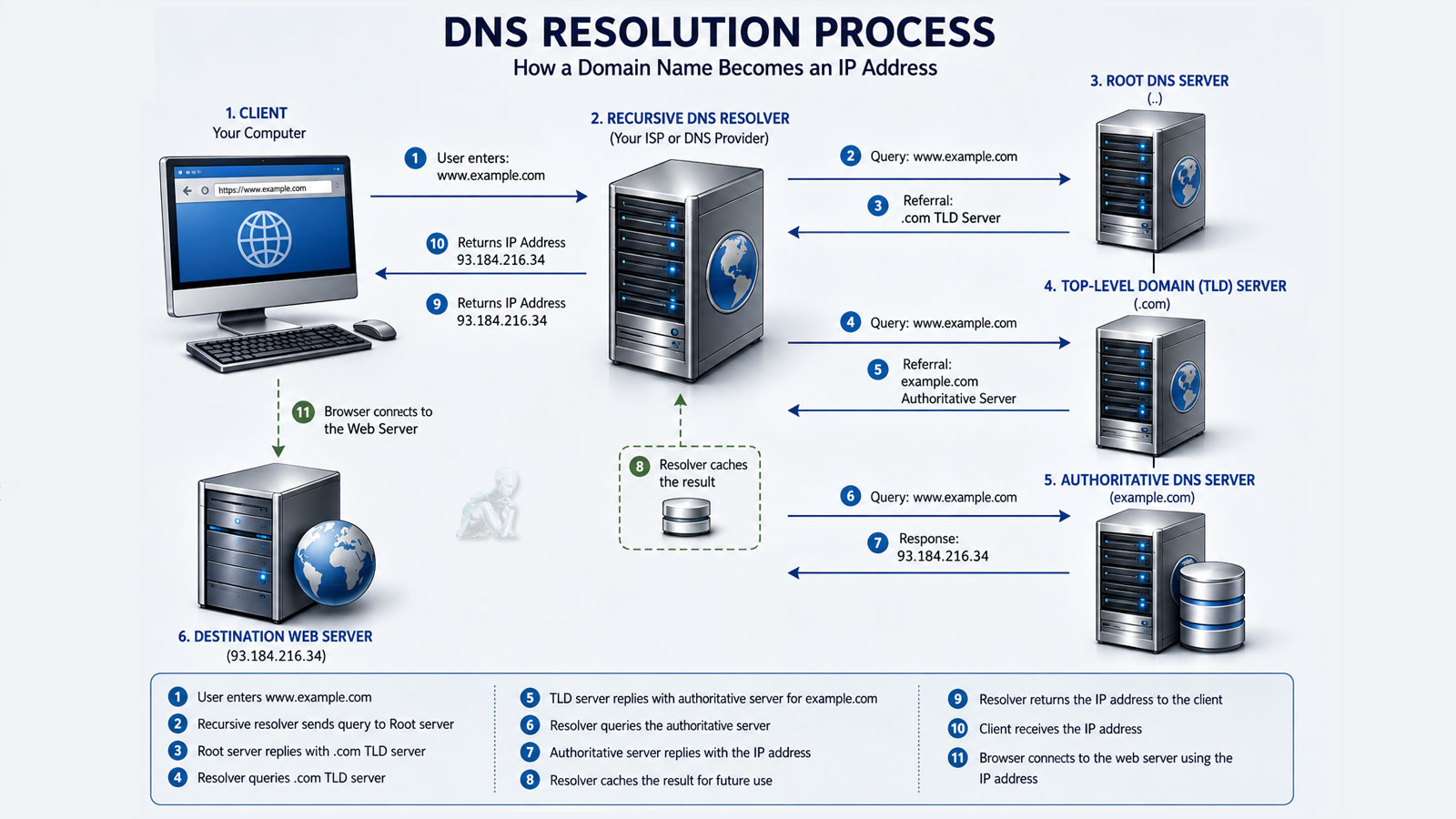
DNS resolution process showing a computer communicating with a recursive resolver, root server, TLD server, authoritative DNS server, and destination web server.

How DNS Resolution Works Every Time You Visit a Website

Every time you enter a website address into your browser, a series of events takes place behind the scenes before the page begins to load. One of the most important of these processes is Domain Name System (DNS) resolution, which translates a human-readable domain name into the numerical Internet Protocol (IP) address required for computers to communicate across the internet.

Although DNS resolution typically occurs in only a fraction of a second, it involves multiple systems working together to locate the correct destination. Understanding this process helps explain why websites sometimes load slowly, why DNS-related errors occur, and why changing DNS servers can occasionally improve browsing performance.

The Domain Name System serves as the internet’s directory service. Rather than requiring users to remember numerical IP addresses for every website they visit, DNS allows simple domain names to be used instead. When a domain name is entered into a browser, DNS translates that name into the appropriate IP address so the browser can establish a connection with the correct web server.

The DNS Resolution Process

A DNS lookup usually begins with the operating system checking its local DNS cache to determine whether the requested address has already been resolved recently. If no valid cached record exists, the request is forwarded to a recursive DNS resolver, which searches for the correct answer by communicating with several DNS servers responsible for different portions of the internet’s domain name hierarchy.

Within milliseconds, the resolver identifies the authoritative DNS server responsible for the requested domain, retrieves the appropriate IP address, and returns that information to the requesting device. The browser then uses the IP address to establish a connection with the website.

  • Step
  • Browser Cache
  • Operating System Cache
  • Recursive Resolver
  • Root DNS Server
  • TLD DNS Server
  • Authoritative DNS Server
  • Purpose
  • Checks for a previously stored address
  • Searches recently resolved DNS records
  • Performs the DNS lookup
  • Identifies the appropriate top-level domain
  • Locates the authoritative DNS server
  • Returns the website’s IP address
Important
Pencil Pencil

DNS does not host websites or store their content. Its purpose is simply to locate the correct server by translating a domain name into the IP address needed to establish the connection.

Why DNS Problems Occur

DNS-related issues can result from outdated cached records, temporary server outages, incorrect DNS configuration, expired domain records, network interruptions, or problems affecting an internet service provider. When DNS resolution fails, browsers often display messages indicating that the server cannot be found even though the website itself may still be operating normally.

Choosing a DNS Provider

Many internet users rely on the DNS servers provided by their internet service provider, while others choose public DNS services offered by organizations specializing in internet infrastructure. Factors such as speed, reliability, privacy features, security protections, and geographic location may influence DNS performance depending on the user’s network environment.

Why It Matters

DNS resolution is one of the fundamental processes that makes the modern internet practical to use. By translating domain names into IP addresses within milliseconds, DNS allows users to access websites without remembering complex numerical addresses. Although most DNS activity occurs invisibly, understanding how the process works provides valuable insight into website performance, connectivity problems, and the overall operation of the internet.

Repair Insights

  • CPU being removed from a desktop computer during hardware repair and component replacement.
    A Failed Part May Be Only One Piece of the ProblemAugust 8, 2026 - 10:54 pm
  • Open desktop PC showing heavy dust buildup on the fans and internal components restricting airflow.
    Cooling Problems Rarely Begin as Obvious FailuresMay 11, 2026 - 9:25 pm
  • Vietnam War video game frozen on a computer screen during gameplay without displaying a blue screen.
    Computer Randomly Freezes Without a Blue ScreenMarch 20, 2026 - 12:10 am
  • Laptop motherboard showing liquid damage and corrosion around an integrated circuit.
    Liquid Damage Continues After the SpillJanuary 3, 2026 - 10:54 pm
  • Best Apple MacBook Pro, MacBook Air, iMac, and Mac mini repair services in Miami, FL
    Best Apple Mac Repair Services in Miami, FLMarch 2, 2025 - 6:34 pm
  • ASUS ROG Zephyrus Laptop Repair and Upgrade Evaluation
    It’s time to either repair your laptop or upgrade!March 2, 2025 - 4:57 pm
  • CORSAIR HX1500i Power Supply Repair and Upgrade Evaluation
    PSU Repair or Upgrade Services in 2025March 2, 2025 - 6:03 am
  • Best Gaming Motherboard Repair or Replacement 2025
    Best Gaming Motherboard Repair or Replacement 2025March 2, 2025 - 4:19 am

Technical Knowledge

  • Laptop with an M.2 SSD and 2.5-inch SSD that support SMART drive health monitoring.
    The SMART Drive Health DataAugust 8, 2026 - 11:29 pm
  • TUF Gaming UEFI BIOS interface showing system configuration and boot settings before Windows starts.
    The UEFI Boot ProcessJune 10, 2026 - 10:12 pm
  • Binary data with individual zeros and ones highlighted to illustrate memory bit errors corrected by ECC memory.
    Memory Errors MatterApril 7, 2026 - 7:44 pm
  • DNS resolution process showing a computer communicating with a recursive resolver, root server, TLD server, authoritative DNS server, and destination web server.
    What Is DNSFebruary 18, 2026 - 11:36 pm
  • Custom-built gaming PC with multiple RGB fans, high-performance GPU, visible motherboard circuitry, cable routing, and vibrant internal lighting throughout the case
    Building the Ultimate Gaming PC in 2025 for High PerformanceJune 11, 2025 - 10:13 pm
  • Autonomous car on a highway using onboard sensors and cameras to detect nearby vehicles, track lane positioning, and process real-time driving conditions without a human driver
    The Future Is Autonomous Systems Driven by AI DiagnosticsJune 11, 2025 - 9:58 pm
  • Autonomous AI system performing real-time diagnostics and data processing
    Agentic AI and Generative Intelligence Redefining the LandscapeJune 11, 2025 - 9:37 pm
  • User interacting with virtual reality interface simulating AI diagnostics and digital environments
    Navigating Today’s Tech Realities with ConfidenceJune 11, 2025 - 8:56 pm
  • Legion gaming laptop with back cover removed showing internal components, dual cooling fans, heat pipes, and dust buildup for maintenance inspection
    Detecting if your gaming laptop requires air cleaning maintenanceApril 12, 2025 - 1:08 am
  • ASUS ROG Strix motherboard inside a custom-built gaming PC running with visible components, active lighting, and system operation
    The Best Practices for Building a Custom Gaming PCApril 12, 2025 - 12:48 am
  • Custom-built PC with hard tube liquid cooling system open during repair, showing fittings being removed after a water leak
    Mistakes to Avoid when trying to Repair a Liquid Damaged PCApril 12, 2025 - 12:32 am
  • AORUS gaming PC with blue LED cooling fans actively running, showing internal components and illuminated system performance setup
    Enhance the Performance of your Gaming PC for streamingApril 12, 2025 - 12:01 am
  • Laptop open with colorful lighting across the keyboard and display
    Identifying the causes of slow laptop performanceApril 11, 2025 - 11:36 pm
  • Intel Core i9 9th Generation Unlocked Desktop Processor Evaluation
    In 2025, which CPUs are the best for upgrading or replacing?March 2, 2025 - 5:05 am
  • Protect yourself and your Computer Hardware
    Protect yourself and your Computer HardwareApril 24, 2014 - 5:13 pm
  • Choosing the Right Memory Replacement
    Finding the Best Memory ReplacementApril 24, 2014 - 4:20 pm
  • Laptop internal view showing 2.5 inch HDD drive and hardware components with bottom cover removed
    How to Replace your Laptop HDDApril 24, 2014 - 3:29 pm
  • Desktop keyboard with LED backlit keys illuminated during use
    Learning about computer keyboardsFebruary 6, 2014 - 1:08 pm
  • Latest MacBook Pro shown from front and back with display and aluminum chassis design
    MacBook Pro is the Best for your BusinessDecember 28, 2013 - 6:04 pm
  • Recommendations On How to Fix a Laptop Or Notebook Battery Not Charging
    Recommendations On How to Fix a Laptop Or Notebook Battery Not ChargingDecember 27, 2013 - 12:40 am

Explore Topics

Contact

Call (305) 600-4217

support@computerrepairmiamis.com

More Information

Blog

Contact Page

Core Services

  • PC Repair
  • Laptop Repair
  • Mac Repair
  • Data Recovery
  • Virus Removal
  • Networking
  • View All Services

Service Areas

  • Miami
  • Miami Beach
  • Coral Gables
  • Hialeah
  • Doral
  • Homestead
  • View All Locations

Operating Hours

🕒 Monday through Saturday
9:00 AM to 6:00 PM

Service Area
Serving Miami and surrounding areas throughout Miami-Dade County

© 2011-2026 Computer Repair Miamis. All Rights Reserved.
Privacy Policy · Terms of Service · Service & Repair Policy
  • Link to X
  • Link to Instagram Link to Instagram Link to Instagram
  • Link to Tumblr
  • Link to Pinterest
  • Link to Facebook Link to Facebook Link to Facebook
  • Link to Vimeo
Scroll to top Scroll to top Scroll to top