
Call (305) 600-4217 Book Now Get 10% off your repair service
Computer Repair Miamis
  • PC REPAIR
  • LAPTOP REPAIR
  • MAC REPAIR
  • GAMING PC SERVICES
  • SERVICES
  • LOCATIONS
  • CONTACT
  • Click to open the search input field Click to open the search input field Search
  • Menu Menu

Liquid Damage Continues After the Spill

You are here: Home1 / Computer Repair Blog for Diagnostics, Hardware, and System Care2 / Repair Insights3 / Liquid Damage Continues After the Spill
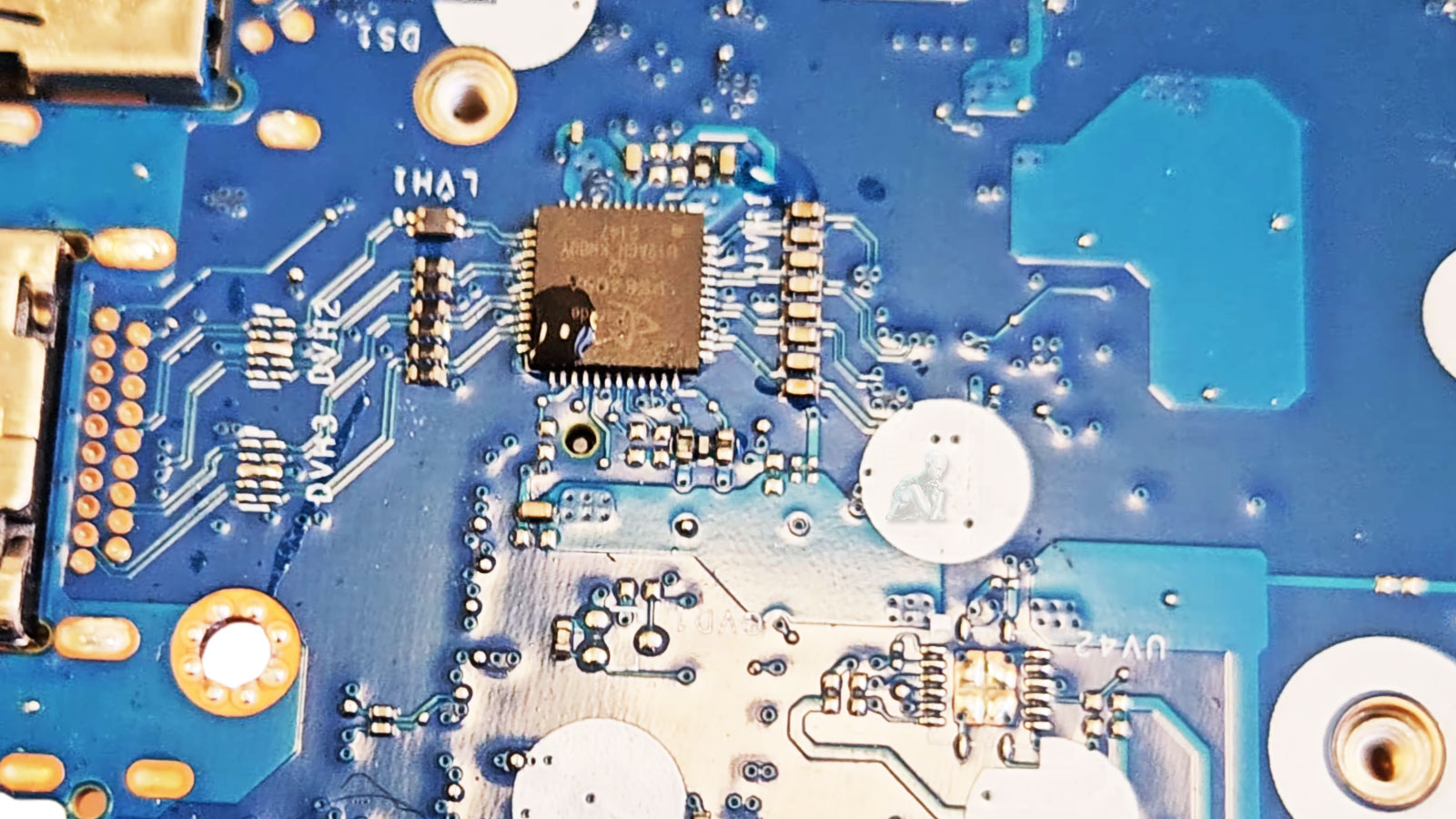
Laptop motherboard showing liquid damage and corrosion around an integrated circuit.

Some Liquid-Damaged Devices Work Again until They Suddenly Don’t

Repairing a liquid-damaged electronic device often produces surprising results. In many cases, a computer, laptop, smartphone, or other electronic device may appear to function normally immediately after being cleaned or repaired, only to develop new problems days, weeks, or even months later. This behavior is not unusual and is one of the reasons liquid damage is considered among the most unpredictable types of electronic failures.

The initial recovery of a device should never be interpreted as confirmation that all damage has been eliminated. Even when a repair is successful, microscopic corrosion, contamination, and chemical residues may continue affecting electronic components long after the original spill has occurred. Understanding why this happens helps set realistic expectations and explains why liquid-damaged equipment often requires ongoing observation after the initial repair.

Unlike mechanical failures that usually occur at a specific moment, liquid damage often progresses over time. Water, coffee, soda, juice, and many other liquids leave behind conductive minerals, sugars, acids, or other contaminants that remain on electronic components even after the visible moisture has evaporated.

These residues gradually attack solder joints, integrated circuits, connectors, and tiny copper traces. Corrosion may continue expanding beneath components where it cannot be seen without specialized equipment. As electrical resistance changes, previously stable circuits may begin producing intermittent failures that were not present during the initial inspection.

Notification
Pencil Pencil

A device that powers on after liquid exposure should never be considered fully recovered without a proper inspection and cleaning. Hidden corrosion can continue developing long after the visible liquid has disappeared.

Devices Sometimes Work Perfectly at First

One of the most confusing aspects of liquid damage is that many devices continue operating normally immediately after the incident. This occurs because corrosion usually develops gradually rather than instantly. At first, electrical connections may still be intact, allowing the device to boot and appear functional.

As oxidation progresses, however, resistance increases, connectors deteriorate, and microscopic conductive paths begin failing. The result is often a device that appears completely repaired before developing random shutdowns, charging problems, keyboard failures, display issues, or motherboard faults weeks later.

Common Delayed Symptoms

  • Delayed Symptom
  • Random shutdowns
  • Battery charging issues
  • Keyboard failures
  • Touchpad problems
  • USB failures
  • Display flickering
  • Wi-Fi instability
  • No power
  • Possible Cause
  • Corrosion affecting power circuits
  • Damaged charging components
  • Corroded keyboard matrix
  • Connector contamination
  • Oxidized contacts
  • Damaged display circuitry
  • Corroded wireless module connections
  • Progressive motherboard failure

Liquid Damage Remains Unpredictable

Liquid damage is rarely a single event. Instead, it often begins a chemical process that can continue affecting electronic components long after the original spill. A device that appears fully functional immediately after a repair may still contain hidden corrosion capable of causing future failures.

Prompt professional cleaning and evaluation offer the best opportunity to minimize long-term damage and improve the likelihood of a successful repair. Even then, understanding the unpredictable nature of liquid exposure helps establish realistic expectations and encourages continued monitoring of the device after service has been completed.

Repair Insights

  • CPU being removed from a desktop computer during hardware repair and component replacement.
    A Failed Part May Be Only One Piece of the ProblemAugust 8, 2026 - 10:54 pm
  • Open desktop PC showing heavy dust buildup on the fans and internal components restricting airflow.
    Cooling Problems Rarely Begin as Obvious FailuresMay 11, 2026 - 9:25 pm
  • Vietnam War video game frozen on a computer screen during gameplay without displaying a blue screen.
    Computer Randomly Freezes Without a Blue ScreenMarch 20, 2026 - 12:10 am
  • Laptop motherboard showing liquid damage and corrosion around an integrated circuit.
    Liquid Damage Continues After the SpillJanuary 3, 2026 - 10:54 pm
  • Best Apple MacBook Pro, MacBook Air, iMac, and Mac mini repair services in Miami, FL
    Best Apple Mac Repair Services in Miami, FLMarch 2, 2025 - 6:34 pm
  • ASUS ROG Zephyrus Laptop Repair and Upgrade Evaluation
    It’s time to either repair your laptop or upgrade!March 2, 2025 - 4:57 pm
  • CORSAIR HX1500i Power Supply Repair and Upgrade Evaluation
    PSU Repair or Upgrade Services in 2025March 2, 2025 - 6:03 am
  • Best Gaming Motherboard Repair or Replacement 2025
    Best Gaming Motherboard Repair or Replacement 2025March 2, 2025 - 4:19 am

Technical Knowledge

  • Laptop with an M.2 SSD and 2.5-inch SSD that support SMART drive health monitoring.
    The SMART Drive Health DataAugust 8, 2026 - 11:29 pm
  • TUF Gaming UEFI BIOS interface showing system configuration and boot settings before Windows starts.
    The UEFI Boot ProcessJune 10, 2026 - 10:12 pm
  • Binary data with individual zeros and ones highlighted to illustrate memory bit errors corrected by ECC memory.
    Memory Errors MatterApril 7, 2026 - 7:44 pm
  • DNS resolution process showing a computer communicating with a recursive resolver, root server, TLD server, authoritative DNS server, and destination web server.
    What Is DNSFebruary 18, 2026 - 11:36 pm
  • Custom-built gaming PC with multiple RGB fans, high-performance GPU, visible motherboard circuitry, cable routing, and vibrant internal lighting throughout the case
    Building the Ultimate Gaming PC in 2025 for High PerformanceJune 11, 2025 - 10:13 pm
  • Autonomous car on a highway using onboard sensors and cameras to detect nearby vehicles, track lane positioning, and process real-time driving conditions without a human driver
    The Future Is Autonomous Systems Driven by AI DiagnosticsJune 11, 2025 - 9:58 pm
  • Autonomous AI system performing real-time diagnostics and data processing
    Agentic AI and Generative Intelligence Redefining the LandscapeJune 11, 2025 - 9:37 pm
  • User interacting with virtual reality interface simulating AI diagnostics and digital environments
    Navigating Today’s Tech Realities with ConfidenceJune 11, 2025 - 8:56 pm
  • Legion gaming laptop with back cover removed showing internal components, dual cooling fans, heat pipes, and dust buildup for maintenance inspection
    Detecting if your gaming laptop requires air cleaning maintenanceApril 12, 2025 - 1:08 am
  • ASUS ROG Strix motherboard inside a custom-built gaming PC running with visible components, active lighting, and system operation
    The Best Practices for Building a Custom Gaming PCApril 12, 2025 - 12:48 am
  • Custom-built PC with hard tube liquid cooling system open during repair, showing fittings being removed after a water leak
    Mistakes to Avoid when trying to Repair a Liquid Damaged PCApril 12, 2025 - 12:32 am
  • AORUS gaming PC with blue LED cooling fans actively running, showing internal components and illuminated system performance setup
    Enhance the Performance of your Gaming PC for streamingApril 12, 2025 - 12:01 am
  • Laptop open with colorful lighting across the keyboard and display
    Identifying the causes of slow laptop performanceApril 11, 2025 - 11:36 pm
  • Intel Core i9 9th Generation Unlocked Desktop Processor Evaluation
    In 2025, which CPUs are the best for upgrading or replacing?March 2, 2025 - 5:05 am
  • Protect yourself and your Computer Hardware
    Protect yourself and your Computer HardwareApril 24, 2014 - 5:13 pm
  • Choosing the Right Memory Replacement
    Finding the Best Memory ReplacementApril 24, 2014 - 4:20 pm
  • Laptop internal view showing 2.5 inch HDD drive and hardware components with bottom cover removed
    How to Replace your Laptop HDDApril 24, 2014 - 3:29 pm
  • Desktop keyboard with LED backlit keys illuminated during use
    Learning about computer keyboardsFebruary 6, 2014 - 1:08 pm
  • Latest MacBook Pro shown from front and back with display and aluminum chassis design
    MacBook Pro is the Best for your BusinessDecember 28, 2013 - 6:04 pm
  • Recommendations On How to Fix a Laptop Or Notebook Battery Not Charging
    Recommendations On How to Fix a Laptop Or Notebook Battery Not ChargingDecember 27, 2013 - 12:40 am

Explore Topics

Contact

Call (305) 600-4217

support@computerrepairmiamis.com

More Information

Blog

Contact Page

Core Services

  • PC Repair
  • Laptop Repair
  • Mac Repair
  • Data Recovery
  • Virus Removal
  • Networking
  • View All Services

Service Areas

  • Miami
  • Miami Beach
  • Coral Gables
  • Hialeah
  • Doral
  • Homestead
  • View All Locations

Operating Hours

🕒 Monday through Saturday
9:00 AM to 6:00 PM

Service Area
Serving Miami and surrounding areas throughout Miami-Dade County

© 2011-2026 Computer Repair Miamis. All Rights Reserved.
Privacy Policy · Terms of Service · Service & Repair Policy
  • Link to X
  • Link to Instagram Link to Instagram Link to Instagram
  • Link to Tumblr
  • Link to Pinterest
  • Link to Facebook Link to Facebook Link to Facebook
  • Link to Vimeo
Scroll to top Scroll to top Scroll to top