
How DNS Resolution Works Every Time You Visit a Website
Every time you enter a website address into your browser, a series of events takes place behind the scenes before the page begins to load. One of the most important of these processes is Domain Name System (DNS) resolution, which translates a human-readable domain name into the numerical Internet Protocol (IP) address required for computers to communicate across the internet.
Although DNS resolution typically occurs in only a fraction of a second, it involves multiple systems working together to locate the correct destination. Understanding this process helps explain why websites sometimes load slowly, why DNS-related errors occur, and why changing DNS servers can occasionally improve browsing performance.
The Domain Name System serves as the internet’s directory service. Rather than requiring users to remember numerical IP addresses for every website they visit, DNS allows simple domain names to be used instead. When a domain name is entered into a browser, DNS translates that name into the appropriate IP address so the browser can establish a connection with the correct web server.
The DNS Resolution Process
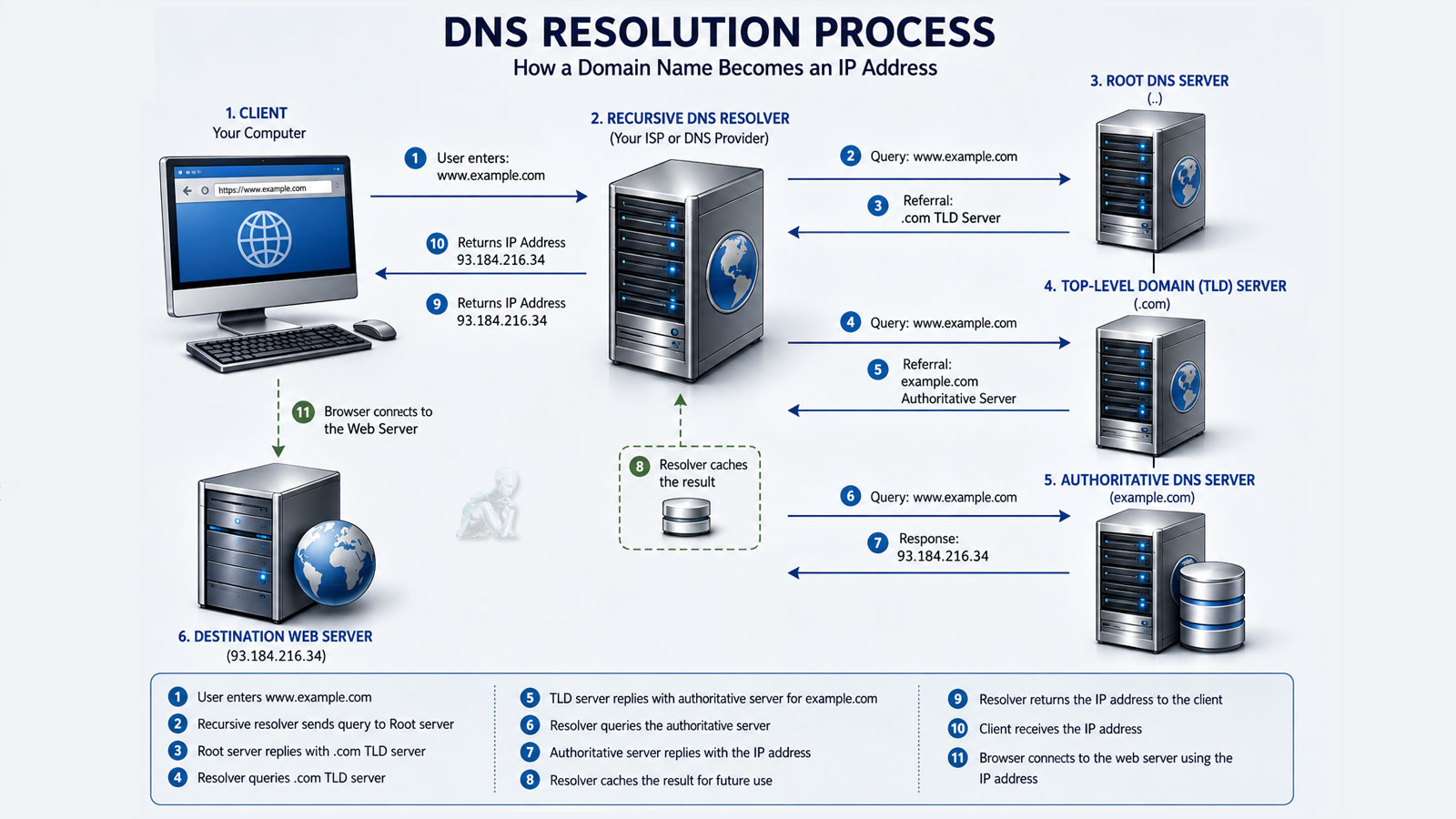
A DNS lookup usually begins with the operating system checking its local DNS cache to determine whether the requested address has already been resolved recently. If no valid cached record exists, the request is forwarded to a recursive DNS resolver, which searches for the correct answer by communicating with several DNS servers responsible for different portions of the internet’s domain name hierarchy.
Within milliseconds, the resolver identifies the authoritative DNS server responsible for the requested domain, retrieves the appropriate IP address, and returns that information to the requesting device. The browser then uses the IP address to establish a connection with the website.
- Step
- Browser Cache
- Operating System Cache
- Recursive Resolver
- Root DNS Server
- TLD DNS Server
- Authoritative DNS Server
- Purpose
- Checks for a previously stored address
- Searches recently resolved DNS records
- Performs the DNS lookup
- Identifies the appropriate top-level domain
- Locates the authoritative DNS server
- Returns the website’s IP address
Why DNS Problems Occur
DNS-related issues can result from outdated cached records, temporary server outages, incorrect DNS configuration, expired domain records, network interruptions, or problems affecting an internet service provider. When DNS resolution fails, browsers often display messages indicating that the server cannot be found even though the website itself may still be operating normally.
Choosing a DNS Provider
Many internet users rely on the DNS servers provided by their internet service provider, while others choose public DNS services offered by organizations specializing in internet infrastructure. Factors such as speed, reliability, privacy features, security protections, and geographic location may influence DNS performance depending on the user’s network environment.
Why It Matters
DNS resolution is one of the fundamental processes that makes the modern internet practical to use. By translating domain names into IP addresses within milliseconds, DNS allows users to access websites without remembering complex numerical addresses. Although most DNS activity occurs invisibly, understanding how the process works provides valuable insight into website performance, connectivity problems, and the overall operation of the internet.