• Home |
  • SITEMAP
Computer Repair Miamis logo
  • DESKTOP
    • Desktop Data Recovery
  • LAPTOP
    • LAPTOP DATA RECOVERY
  • MAC REPAIR
    • MAC DATA RECOVERY
    • iPHONE
  • Services
  • Areas we Serve
  • BLOG
  • CONTACT US
    • SITEMAP
    • FREE DELIVERY
  • Home
  • » Mac Services » Mac Pro Hardware Upgrades

Mac Pro Hardware Upgrades

Expand Performance, Storage, and Graphics Without Replacing Your System

⚙️ Your Mac Pro was built to evolve, not to be replaced.

Apple designed the Mac Pro as a modular workstation for professionals who outgrow default configurations. As workloads become heavier and software more demanding, strategic hardware upgrades can dramatically extend the life and performance of your system.

We focus on safe, compatible Mac Pro hardware upgrades that increase speed, capacity, and efficiency while preserving macOS stability and existing workflows.


Mac Pro Hardware Upgrade Options

All upgrades are planned around how the system is actually used, not generic benchmarks.

🧠 Memory (RAM) Expansion

  • Increase memory capacity for heavy multitasking and real-time workloads
  • Support for large project files, virtualization, and rendering
  • Stability testing with macOS and professional applications

💾 Storage Upgrades and Expansion

  • Install high-speed internal SSDs or NVMe storage
  • Expand total capacity for media libraries and project archives
  • RAID configurations for speed, redundancy, or backup strategies

🎮 Graphics and MPX Module Upgrades

  • GPU upgrades for rendering, video editing, 3D, and compute tasks
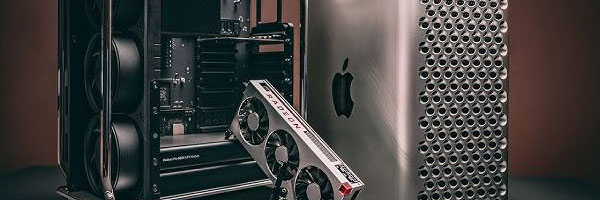
  • Support for AMD Radeon Pro MPX modules and compatible PCIe GPUs
  • External GPU (eGPU) configuration when applicable

🔌 PCIe and I/O Expansion

  • Audio, video, capture, and networking expansion cards
  • Thunderbolt, USB-C, and high-speed data interfaces
  • 10GbE networking for shared storage and studio environments

❄️ Thermal and Performance Optimization

  • Airflow evaluation and fan behavior optimization
  • Thermal paste replacement where beneficial
  • Quiet operation under sustained load

Why Hardware Upgrades Make Sense

💸 Extend the life of an expensive professional workstation
🧩 Avoid software migrations and workflow disruptions
💼 Scale performance as project demands grow
🌱 Reduce electronic waste by maximizing existing hardware

The Mac Pro’s modular design exists for this exact purpose. Strategic upgrades can keep it competitive for years.


Supported Mac Pro Systems

Hardware upgrades are available for:

  • Mac Pro Tower (2019 Intel)
  • Mac Pro Cylinder (2013)
  • Apple Silicon Mac Pro systems, including M2 Ultra
  • Custom configurations with PCIe cards, RAID, and expansion modules

Each upgrade is evaluated for compatibility, thermal limits, and macOS support before installation.


Why Professionals Trust This Approach

  • Experience with high-performance Mac Pro configurations
  • Careful component selection to avoid instability
  • Full system testing after every upgrade
  • Data-safe procedures that protect existing installations
  • Honest guidance focused on real performance gains

Upgrades are done with the mindset that downtime is costly and mistakes are unacceptable.


Mac Pro Upgrade Services Available Locally

Hardware upgrades are available for individual professionals, studios, and businesses throughout the Miami area, with options for in-store service, pickup and delivery, or on-site support depending on the setup.


Schedule a Mac Pro Hardware Upgrade

If your Mac Pro is being held back by memory limits, slow storage, or outdated graphics, an upgrade can unlock performance without replacing the entire system. A proper evaluation ensures the right components are installed for long-term reliability.

Comments are closed.

Geek Corners

  • Detecting if your gaming laptop requires air cleaning maintenance April 12, 2025
  • The Best Practices for Building a Custom Gaming PC April 11, 2025
  • Mistakes to avoid when trying to repair a liquid damaged pc April 10, 2025
  • Enhance the performance of your gaming PC for streaming April 8, 2025
  • Identifying the causes of slow laptop performance April 6, 2025
  • Home Services April 4, 2025
  • Wiring Installation April 3, 2025
  • Security Cameras April 1, 2025
  • Wired and Wireless Network Mar 28, 2025
  • Data Recovery Mar 27, 2025
  • Game Console Diagnostic Mar 25, 2025
  • Drone Repairs Mar 23, 2025
  • Microsoldering Services Mar 22, 2025
  • Tablet Diagnostic Mar 21, 2025
  • iPhone Repairs Mar 20, 2025
  • Mac Pro Power Supply Repairs Mar 18, 2025
  • Mac Pro Data Transfer Mar 15, 2025
  • Mac Pro Data Recovery Mar 14, 2025
  • Mac Pro Software Configuration Mar 13, 2025
  • Mac Pro Logic Board Repairs Mar 12, 2025
  • Mac Pro Hardware Upgrades Mar 10, 2025
  • Mac Pro Video Repairs Mar 8, 2025
  • Mac Pro Hard Drive Replacement Mar 7, 2025
  • Mac Pro Cleaning and Maintenance Mar 4, 2025
  • Mac Pro Repair Diagnostic Mar 3, 2025
  • Desktop Computer Data Recovery Mar 2, 2025
  • Desktop Computer Data Transfer Mar 1, 2025
  • Desktop Computer Software Configuration Mar 1, 2025
  • Desktop Computer Hardware Upgrades Feb 27, 2025
  • Desktop Computer Motherboard Repairs Feb 25, 2025
  • Desktop Computer Hard Drive Replacement Feb 24, 2025
  • Desktop Computer Cleaning and Maintenance Feb 23, 2025
  • Desktop Computer Repair Diagnostic Feb 21, 2025
  • All-in-One Computer Data Recovery Feb 18, 2025
  • All-in-One Computer Data Transfer Feb 17, 2025
  • All-in-One Software Configuration Feb 16, 2025
  • All-in-One Computer Hardware Upgrades Feb 14, 2025
  • All-in-One Computer Motherboard Repairs Feb 13, 2025
  • All-in-One Computer Hard Drive Replacement Feb 11, 2025
  • All-in-One Computer Power Supply Repairs Feb 10, 2025
  • All-in-One Computer Cleaning and Maintenance Feb 9, 2025
  • All-in-One Computer Repair Diagnostic Feb 7, 2025
  • MacBook Air Data Transfer Feb 5, 2025
  • MacBook Air Software Configuration Feb 4, 2025
  • MacBook Air Data Recovery Feb 3, 2025
  • MacBook Air Liquid Damage Repairs Feb 2, 2025
  • MacBook Air Logic Board Repairs Feb 1, 2025
  • MacBook Air Trackpad Repairs Jan 25, 2025
  • MacBook Air DC Jack Repairs Jan 24, 2025
  • MacBook Air Hard Drive Replacement Jan 23, 2025
  • MacBook Air Battery Replacement Jan 22, 2025
  • MacBook Air Keyboard Repairs Jan 21, 2025
  • MacBook Air Screen Repairs Jan 20, 2025
  • MacBook Air Cleaning and Maintenance Jan 19, 2025
  • MacBook Air Repair Diagnostic Jan 15, 2025
  • iMac Data Recovery Jan 14, 2025
  • iMac Data Transfer Jan 13, 2025
  • iMac Software Configuration Jan 11, 2025
  • iMac Logic Board Repair Jan 10, 2025
  • iMac Video Repair Jan 8, 2025

Frequently Served Cities

  • West Miami
  • Key Biscayne
  • Indian Creek
  • Cutler Bay
  • Miami Gardens
  • Hialeah Gardens
  • Palmetto Bay
  • North Bay Village
  • Bal Harbour
  • Homestead

Primary Service Zones

  • Miami
  • Miami Springs
  • South Miami
  • Pinecrest
  • Doral
  • Coral Gables
  • Sweetwater
  • North Miami Beach
  • Edgewater Miami
  • Downtown Miami

Popular Service Regions

  • Brickell Miami
  • Medley
  • Hialeah
  • Opa Locka
  • Midtown Miami
  • Virginia Gardens
  • North Miami
  • Miami Beach
  • Miami Shores
  • Miami Lakes

Fast, affordable Computer Repair Near You in Miami

Free pickup and delivery available for Miami residents. Call (305) 600-4217

Serving Miami residents with reliable PC and Mac repair

© 2011-2025 Computer Repair Miamis . All Rights Reserved.

  • Twitter
  • Facebook
  • Vimeo
Pinterest Tumblr Instagram