
Call (305) 600-4217 Book Now Get 10% off your repair service
Computer Repair Miamis
  • PC REPAIR
  • LAPTOP REPAIR
  • MAC REPAIR
  • GAMING PC SERVICES
  • SERVICES
  • LOCATIONS
  • CONTACT
  • Click to open the search input field Click to open the search input field Search
  • Menu Menu

Signs of Laptop Motherboard Failure

You are here: Home1 / Computer Repair Blog for Diagnostics, Hardware, and System Care2 / Technical Knowledge3 / Signs of Laptop Motherboard Failure
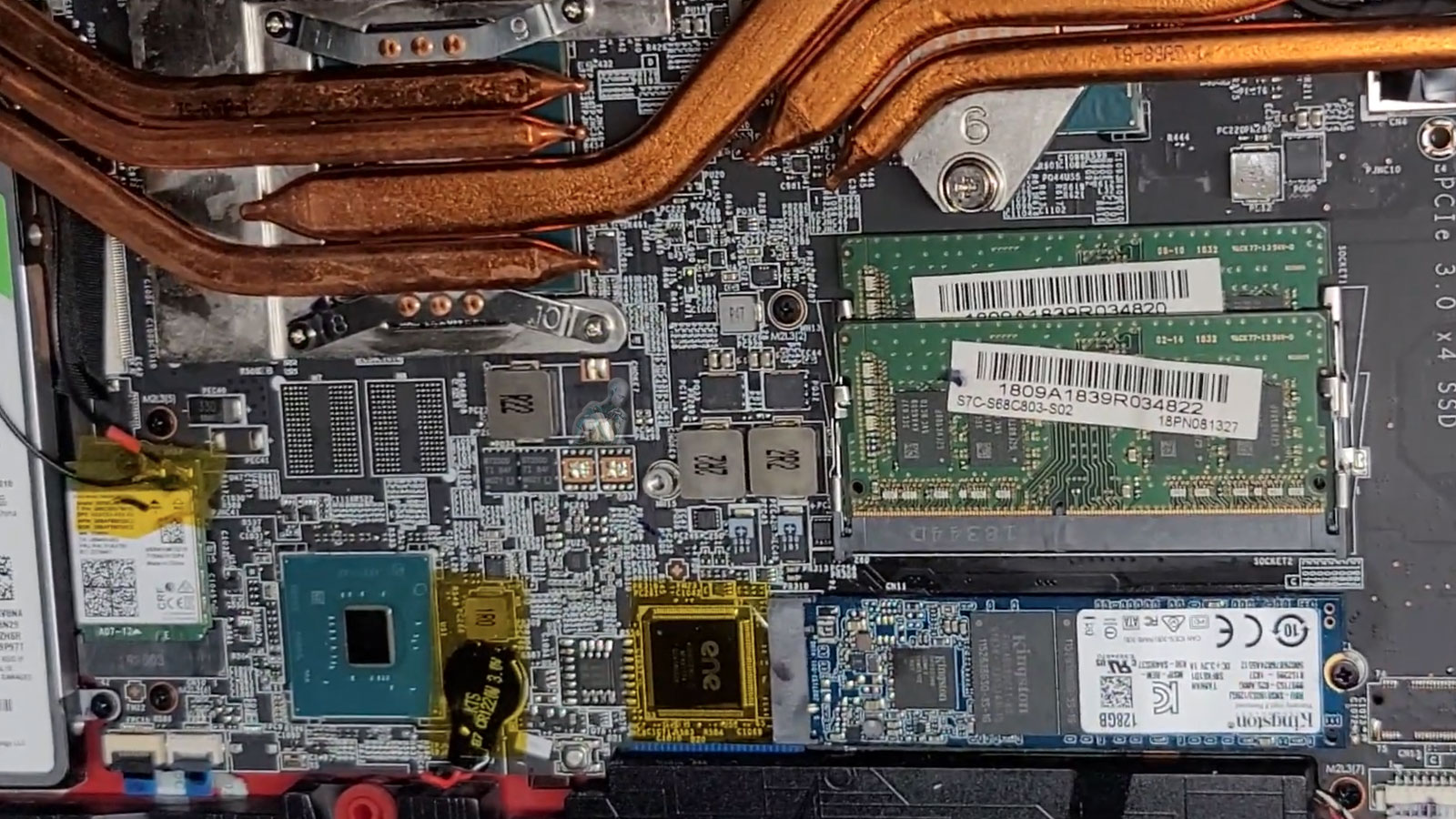
Laptop heatsink installed over CPU and GPU chips showing thermal cooling system inside motherboard

Signs of Laptop Motherboard Failure – Expert Laptop Motherboard Repair in Miami

Are you experiencing strange issues with your laptop, such as random shutdowns, failure to boot, or no power at all? These could be signs of laptop motherboard failure. At our Laptop Motherboard Repair in Miami service center, we specialize in diagnosing and fixing motherboard issues to restore your laptop’s functionality.

Common Signs of Laptop Motherboard Failure
Recognizing the symptoms early can prevent further damage and data loss. Here are the most common signs that your laptop motherboard may be failing:

  • Laptop Won’t Turn On No power, no lights, and no response when pressing the power button.
  • Frequent System Crashes & Freezing Your laptop randomly crashes or freezes, even after reinstalling the operating system.
  • Overheating Issues The laptop gets extremely hot, even with proper ventilation, due to motherboard component failure.
  • Beeping Sounds at Startup Unusual beep codes during startup indicate motherboard failure or related hardware issues.
  • No Display on the Screen The laptop powers on, but the screen remains black or flickers intermittently.
  • Laptop Shuts Down Randomly Your device turns off unexpectedly, even when the battery is charged and the charger is connected.
  • USB & Port Failures Non-functioning USB ports, audio jacks, or other ports due to motherboard circuit failures.
  • Charging Issues Laptop doesn’t charge properly or fails to detect the charger.
  • Burning Smell or Visible Damage A burnt smell or visible damage on the motherboard such as swollen capacitors is a major sign of failure.

Our Laptop Motherboard Repair Services in Miami

We offer comprehensive motherboard repair solutions to get your laptop back in working condition:

  • Laptop Motherboard Diagnosis In-depth testing to pinpoint motherboard issues.
  • Chip-Level Repair & Component Replacement Fixing faulty ICs, capacitors, and resistors.
  • Power Supply & Circuit Repair Resolving power-related failures and short circuits.
  • Overheating & Thermal Management Solutions Replacing thermal paste, cooling components, and ensuring proper airflow.
  • BIOS & Firmware Repair Updating or reprogramming corrupted firmware for proper boot functionality.
  • Charging Port & Power Jack Repair Fixing power issues related to faulty charging ports.
  • Liquid Damage Motherboard Repair Restoring motherboards affected by spills or moisture.
  • Data Recovery from Damaged Motherboards Retrieving important files before repair or replacement.

Why Choose Us for Laptop Motherboard Repair in Miami?

  • Experienced & Certified Technicians Skilled in repairing all major laptop brands, including Dell, HP, Lenovo, ASUS, Acer, Apple MacBook, and more.
  • Fast & Reliable Repairs Quick turnaround times to minimize downtime.
  • Affordable & Transparent Pricing Competitive rates with no hidden fees.
  • High-Quality Replacement Parts Ensuring long-lasting repairs with genuine or OEM components.
  • Warranty on Repairs Providing peace of mind with our service guarantee.
  • Convenient Miami Location Easily accessible for drop-offs and pickups.

How Our Laptop Motherboard Repair Process Works

  1. Visit Our Miami Repair Shop Walk in or schedule an appointment online.
  2. Free Diagnosis & Quote We assess your laptop’s motherboard issue and provide a detailed estimate.
  3. Expert Repair & Testing Our technicians carefully repair the motherboard with advanced tools.
  4. Final Testing & Pickup Ensuring your laptop functions optimally before returning it to you.

Get Your Laptop Motherboard Fixed Today!

If you suspect motherboard failure, don’t wait bring your laptop to our Laptop Motherboard Repair in Miami experts today. We’ll diagnose and fix your laptop quickly, ensuring it runs like new again.

Reliable Repairs. Expert Technicians. Affordable Pricing. Get your laptop motherboard repaired today!

Explore Topics

Repair Insights

  • CPU being removed from a desktop computer during hardware repair and component replacement.
    A Failed Part May Be Only One Piece of the ProblemAugust 8, 2026 - 10:54 pm
  • Open desktop PC showing heavy dust buildup on the fans and internal components restricting airflow.
    Cooling Problems Rarely Begin as Obvious FailuresMay 11, 2026 - 9:25 pm
  • Vietnam War video game frozen on a computer screen during gameplay without displaying a blue screen.
    Computer Randomly Freezes Without a Blue ScreenMarch 20, 2026 - 12:10 am
  • Laptop motherboard showing liquid damage and corrosion around an integrated circuit.
    Liquid Damage Continues After the SpillJanuary 3, 2026 - 10:54 pm
  • Best Apple MacBook Pro, MacBook Air, iMac, and Mac mini repair services in Miami, FL
    Best Apple Mac Repair Services in Miami, FLMarch 2, 2025 - 6:34 pm
  • ASUS ROG Zephyrus Laptop Repair and Upgrade Evaluation
    It’s time to either repair your laptop or upgrade!March 2, 2025 - 4:57 pm
  • CORSAIR HX1500i Power Supply Repair and Upgrade Evaluation
    PSU Repair or Upgrade Services in 2025March 2, 2025 - 6:03 am
  • Best Gaming Motherboard Repair or Replacement 2025
    Best Gaming Motherboard Repair or Replacement 2025March 2, 2025 - 4:19 am

Technical Knowledge

  • Laptop with an M.2 SSD and 2.5-inch SSD that support SMART drive health monitoring.
    The SMART Drive Health DataAugust 8, 2026 - 11:29 pm
  • TUF Gaming UEFI BIOS interface showing system configuration and boot settings before Windows starts.
    The UEFI Boot ProcessJune 10, 2026 - 10:12 pm
  • Binary data with individual zeros and ones highlighted to illustrate memory bit errors corrected by ECC memory.
    Memory Errors MatterApril 7, 2026 - 7:44 pm
  • DNS resolution process showing a computer communicating with a recursive resolver, root server, TLD server, authoritative DNS server, and destination web server.
    What Is DNSFebruary 18, 2026 - 11:36 pm
  • Custom-built gaming PC with multiple RGB fans, high-performance GPU, visible motherboard circuitry, cable routing, and vibrant internal lighting throughout the case
    Building the Ultimate Gaming PC in 2025 for High PerformanceJune 11, 2025 - 10:13 pm
  • Autonomous car on a highway using onboard sensors and cameras to detect nearby vehicles, track lane positioning, and process real-time driving conditions without a human driver
    The Future Is Autonomous Systems Driven by AI DiagnosticsJune 11, 2025 - 9:58 pm
  • Autonomous AI system performing real-time diagnostics and data processing
    Agentic AI and Generative Intelligence Redefining the LandscapeJune 11, 2025 - 9:37 pm
  • User interacting with virtual reality interface simulating AI diagnostics and digital environments
    Navigating Today’s Tech Realities with ConfidenceJune 11, 2025 - 8:56 pm
  • Legion gaming laptop with back cover removed showing internal components, dual cooling fans, heat pipes, and dust buildup for maintenance inspection
    Detecting if your gaming laptop requires air cleaning maintenanceApril 12, 2025 - 1:08 am
  • ASUS ROG Strix motherboard inside a custom-built gaming PC running with visible components, active lighting, and system operation
    The Best Practices for Building a Custom Gaming PCApril 12, 2025 - 12:48 am
  • Custom-built PC with hard tube liquid cooling system open during repair, showing fittings being removed after a water leak
    Mistakes to Avoid when trying to Repair a Liquid Damaged PCApril 12, 2025 - 12:32 am
  • AORUS gaming PC with blue LED cooling fans actively running, showing internal components and illuminated system performance setup
    Enhance the Performance of your Gaming PC for streamingApril 12, 2025 - 12:01 am
  • Laptop open with colorful lighting across the keyboard and display
    Identifying the causes of slow laptop performanceApril 11, 2025 - 11:36 pm
  • Intel Core i9 9th Generation Unlocked Desktop Processor Evaluation
    In 2025, which CPUs are the best for upgrading or replacing?March 2, 2025 - 5:05 am
  • Protect yourself and your Computer Hardware
    Protect yourself and your Computer HardwareApril 24, 2014 - 5:13 pm
  • Choosing the Right Memory Replacement
    Finding the Best Memory ReplacementApril 24, 2014 - 4:20 pm
  • Laptop internal view showing 2.5 inch HDD drive and hardware components with bottom cover removed
    How to Replace your Laptop HDDApril 24, 2014 - 3:29 pm
  • Desktop keyboard with LED backlit keys illuminated during use
    Learning about computer keyboardsFebruary 6, 2014 - 1:08 pm
  • Latest MacBook Pro shown from front and back with display and aluminum chassis design
    MacBook Pro is the Best for your BusinessDecember 28, 2013 - 6:04 pm
  • Recommendations On How to Fix a Laptop Or Notebook Battery Not Charging
    Recommendations On How to Fix a Laptop Or Notebook Battery Not ChargingDecember 27, 2013 - 12:40 am

Contact

Call (305) 600-4217

support@computerrepairmiamis.com

More Information

Blog

Contact Page

Core Services

  • PC Repair
  • Laptop Repair
  • Mac Repair
  • Data Recovery
  • Virus Removal
  • Networking
  • View All Services

Service Areas

  • Miami
  • Miami Beach
  • Coral Gables
  • Hialeah
  • Doral
  • Homestead
  • View All Locations

Operating Hours

🕒 Monday through Saturday
9:00 AM to 6:00 PM

Service Area
Serving Miami and surrounding areas throughout Miami-Dade County

© 2011-2026 Computer Repair Miamis. All Rights Reserved.
Privacy Policy · Terms of Service · Service & Repair Policy
  • Link to X
  • Link to Instagram Link to Instagram Link to Instagram
  • Link to Tumblr
  • Link to Pinterest
  • Link to Facebook Link to Facebook Link to Facebook
  • Link to Vimeo
Scroll to top Scroll to top Scroll to top