All-in-One Computer Hard Drive Replacement in Miami

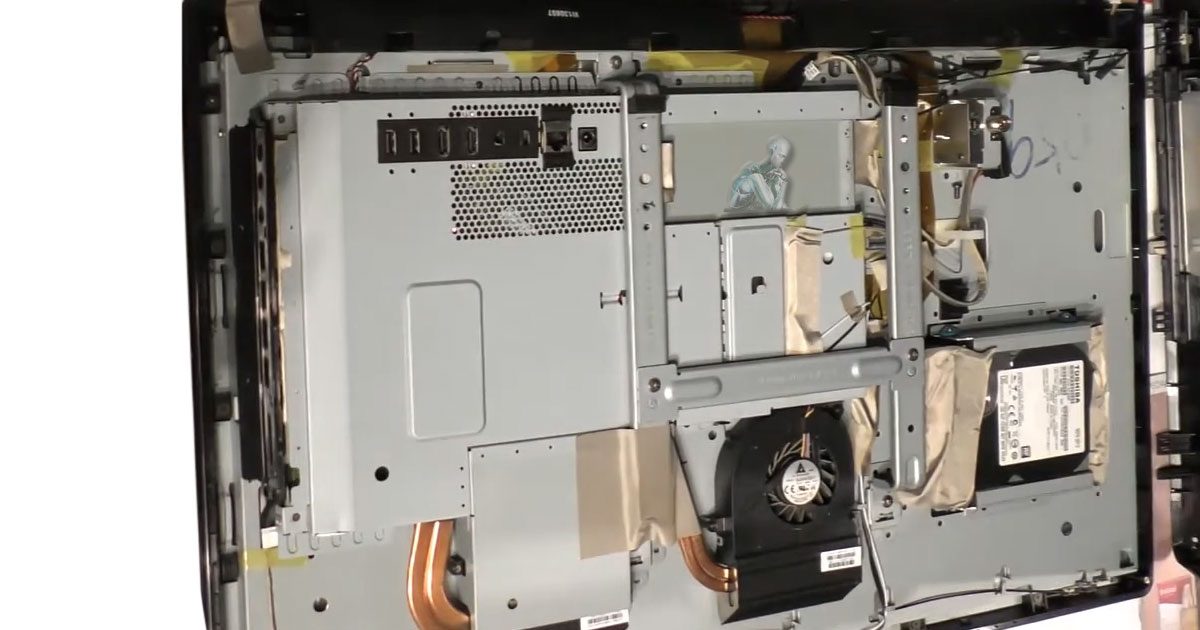
Opened all-in-one computer showing a small 2.5-inch Toshiba hard drive positioned for replacement inside the unit

Replacing Failing Drives and Restoring All-in-One Performance

Restore Speed. Reclaim Storage. Replace with Confidence.


💾 Is Your All-in-One Computer Slowing Down or Not Booting?

Your hard drive is the heart of your All-in-One computer and when it begins to fail, so does your entire system. If you’re experiencing long load times, strange clicking noises, or boot errors, it’s time to consider a professional hard drive replacement.

At Computer Repair Miamis, we specialize in replacing and upgrading hard drives in All-in-One desktops, restoring speed, stability, and extended storage to your trusted device.


🧠 Common Signs You Need a Hard Drive Replacement

  • 🐢 Slow startup or frequent freezes
  • 🚫 “No Bootable Device” or system not recognizing drive
  • 💥 Clicking, grinding, or buzzing noises from your computer
  • 🧱 System crashes, blue screens, or corrupted files
  • 🔁 Endless spinning wheel or loading screens
  • ⚠️ SMART status warnings or drive health alerts

🧠 These signs can indicate a failing hard drive that needs immediate attention to prevent total data loss.


🔧 What’s Included in Our Hard Drive Replacement Service

Whether you need a repair or an upgrade, we handle the entire process with precision:

✅ Professional Diagnosis

We confirm hard drive failure using specialized diagnostic tools and performance scans.

✅ Hard Drive Replacement or Upgrade

We install a new, high-performance drive, either a traditional HDD or a faster SSD, based on your needs and budget.

✅ Data Recovery (Optional)

If your old drive is accessible, we attempt full or partial data recovery before replacing it.

✅ Operating System Installation

We install the latest macOS or Windows version and optimize your system for peak performance.

✅ Post-Service Testing

We verify all hardware and software functionality before returning the system to you.


⚙️ Upgrade to SSD for Faster Performance

Want to speed things up? Upgrade to a Solid-State Drive (SSD) during your replacement service:

  • ⚡ 5x faster boot times
  • 🚀 Quicker application loading
  • 🔋 Better energy efficiency
  • 🛠️ Lower chance of mechanical failure

An SSD can breathe new life into older All-in-One systems, ideal for work, school, or creative projects.


🖥️ Supported All-in-One Brands & Models

We service hard drive replacements on all major AIO models:

  • Apple iMac (Intel & M1/M2 chip models)
  • HP Pavilion, Envy, and EliteOne AIOs
  • Dell Inspiron & XPS All-in-One desktops
  • Lenovo IdeaCentre & Yoga AIOs
  • ASUS Vivo AIO Series
  • Acer Aspire Z Series

Whether you’re replacing a failed drive or upgrading for speed, we’ve got the tools and experience to do it right.


📍 Serving Miami & Beyond

Based in Miami, we offer in-shop repairs, pickup & delivery, and on-site service for businesses and busy professionals. Wherever you are, expert help is just a call away.


📦 Ready to Replace Your Hard Drive?

Avoid complete system failure, act before your data disappears. Let our experts handle your All-in-One hard drive replacement and get your system running like new.

All-in-One Computer Power Supply Repair in Miami

Reliable Power Supply Repair for All-in-One Desktop Systems

Is Your All-in-One Computer Not Powering On or Shutting Down Randomly?

When an All-in-One desktop suddenly becomes unresponsive, shuts off without warning, or refuses to boot, the power supply is often the underlying cause. Because AIO systems integrate power components tightly with the display and logic board, power issues must be handled carefully to avoid further damage.

We diagnose and repair power supply problems in All-in-One computers from all major manufacturers, including iMac, HP, Dell, Lenovo, ASUS, and others. Our goal is to restore stable, reliable power while protecting the rest of the system.


Common Signs of Power Supply Failure

If you are unsure whether the power supply is the problem, these symptoms often point in that direction:

  • No response when pressing the power button
  • Black screen with no fan or drive activity
  • Intermittent shutdowns or restarts
  • Flickering power behavior or unstable startup
  • Buzzing noises or burning smell from inside the unit
  • Dim display or reduced performance under load

Power delivery issues should never be ignored, as they can lead to damage of the logic board, storage, or display components.


What Our Power Supply Repair Service Includes

Our repair process focuses on accurate diagnostics and safe component handling:

  • Complete power diagnostics and voltage testing
  • Internal inspection of the power supply and board connections
  • Repair of power regulation faults when possible
  • Replacement of failed internal power units using manufacturer-approved parts
  • BIOS or firmware power reset when required
  • Post-repair safety and stability testing

All work is performed using electrostatic-safe equipment by technicians experienced with compact All-in-One designs.


Why Professional AIO Power Repair Matters

All-in-One desktops are not built like traditional towers. Their integrated layout makes power repairs more complex and risky without the right tools and experience.

Professional service helps ensure:

  • Correct diagnosis without guesswork
  • Protection of the display panel and logic board
  • Proper power calibration after repair
  • Long-term stability instead of temporary fixes

Supported All-in-One Models

We repair internal power supply issues for a wide range of AIO systems, including:

  • Apple iMac, Intel and Apple Silicon models
  • HP Envy, Pavilion, and EliteOne series
  • Dell Inspiron and XPS All-in-One systems
  • Lenovo IdeaCentre and Yoga AIO
  • ASUS Vivo AIO and Acer Aspire Z series

Whether the system is used for creative work, business tasks, or everyday computing, repairs are handled with precision and care.


Local All-in-One Power Repair Support

Power supply diagnostics and repairs are available for All-in-One desktop users throughout the Miami area. In-shop service is available, with pickup, delivery, or on-site options depending on the system and issue.


Schedule a Power Supply Diagnostic

If your All-in-One computer is not turning on or behaving unpredictably, a professional diagnostic is the safest first step. Identifying the power issue early can prevent more serious internal damage and restore reliable operation.