
MacBook Pro Graphics and GPU Repair in Miami
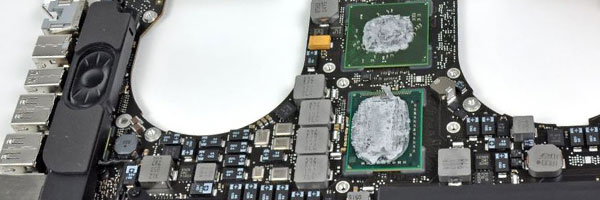
Graphics Failure Diagnosis and Board-Level Repair

Video problems on a MacBook Pro are rarely just display issues. Visual artifacts, sudden freezes, black screens, and crashes during normal use often point to failures in the graphics processor, video memory, or supporting logic board circuits. These issues are especially common in certain Intel-based models, but can also occur in newer systems under thermal or electrical stress.

This service focuses on identifying and correcting the underlying cause of video and GPU-related failures rather than replacing parts blindly.


Common Video and GPU Failure Symptoms

System powers on but no image appears
Screen shows lines, blocks, or color distortion
System freezes during graphics-intensive tasks
Crashes when waking from sleep
External displays fail or behave erratically
Repeated kernel panics related to graphics processes
Performance drops when rendering or decoding video

These symptoms often worsen over time if left unresolved.


Video System Diagnostic Process

Before any repair is attempted, the entire video subsystem is evaluated, including:

Graphics processor behavior under load
Video memory stability
Power delivery to GPU circuits
Thermal response and heat distribution
Logic board signal integrity

This ensures the issue is correctly identified as a GPU, video circuit, or related board-level fault.


GPU and Video Repair Options

Graphics Chip Rework
For models affected by solder joint degradation, controlled reflow or reballing procedures may be used to restore reliable connections between the GPU and logic board.

Component-Level Circuit Repair
Faulty power controllers, capacitors, resistors, or signal components related to video output can be repaired or replaced directly on the board.

Thermal System Correction
Cooling inefficiencies contribute heavily to GPU failure. Fans, heatsinks, and thermal interfaces are addressed to reduce recurrence risk.

Display Output Verification
Internal and external video outputs are tested after repair to confirm stable image rendering and resolution handling.


Supported MacBook Pro Systems

Intel-based MacBook Pro models with integrated or discrete graphics
Models affected by known GPU reliability issues
13-inch, 15-inch, and 16-inch configurations
Retina and non-Retina designs

Apple Silicon systems are evaluated individually due to integrated graphics architecture.


When to Request Video Evaluation

If your MacBook Pro shows visual instability, crashes under normal workloads, or produces no image despite powering on, a proper video diagnostic can prevent unnecessary screen replacement and reduce the risk of data loss or further board damage.

Requests for evaluation can be submitted using the contact us page.
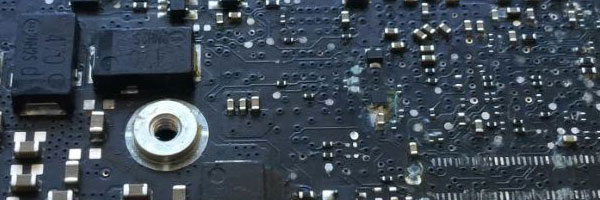
MacBook Pro Liquid and Water Damage Repair in Miami

Component-Level Cleaning and Board Restoration

Liquid exposure is one of the most destructive failures a MacBook Pro can experience. Even small spills can migrate beneath shields, connectors, and chips, causing corrosion that worsens over time. This service focuses on identifying liquid intrusion, removing contamination, and restoring affected components before damage becomes irreversible.

Immediate shutdown does not guarantee safety. Many liquid-related failures develop days or weeks after exposure due to delayed corrosion.


Common Effects of Liquid Exposure

System does not power on
Intermittent shutdowns or restart loops
Keyboard or trackpad malfunction
Charging or battery detection failure
Dim display or no video output
Overheating or abnormal power behavior
Corrosion on internal connectors or logic board traces

Symptoms may appear gradually and are often misdiagnosed as unrelated hardware faults.


Liquid Damage Evaluation Process

Each device is fully disassembled and inspected to determine the extent of exposure. This includes:

Logic board surface and under-shield inspection
Connector and flex cable contamination checks
Battery, keyboard, and trackpad assessment
Power and charging circuit evaluation

This process establishes whether the damage is localized or system-wide.


Board Cleaning and Repair Procedures

Ultrasonic Board Cleaning
Specialized ultrasonic equipment is used to remove residue, minerals, and corrosion from the logic board and affected components without causing mechanical stress.

Component-Level Repair
Damaged chips, capacitors, resistors, and connectors are repaired or replaced directly on the board using micro-soldering techniques.

Circuit Integrity Testing
After cleaning and repair, voltage rails, data paths, and power behavior are tested to confirm stability.

System Reassembly and Validation
All major subsystems are tested, including input devices, display output, charging behavior, wireless connectivity, and thermal response.


MacBook Pro Models Supported

13-inch, 14-inch, 15-inch, and 16-inch MacBook Pro
Intel-based systems (2012–2020)
Apple Silicon systems (M1 and M2), evaluated per case
Retina, Touch Bar, and Magic Keyboard designs

Each model is handled according to its internal layout and board architecture.


Post-Liquid Exposure Considerations

Liquid damage often affects multiple components beyond the logic board. When applicable, further evaluation may include:

Battery condition and swelling
Keyboard and trackpad reliability
Display backlight or panel damage
Storage integrity and data recovery feasibility

Repair options are determined only after the diagnostic process is complete.


When to Request Liquid Damage Service

If a MacBook Pro has been exposed to liquid at any level, professional inspection is strongly recommended even if the system still appears functional. Early intervention significantly increases repair success and reduces long-term failure risk.

Requests for evaluation can be submitted using the contact us page.