
Mac Pro Hardware Upgrade Services in Miami
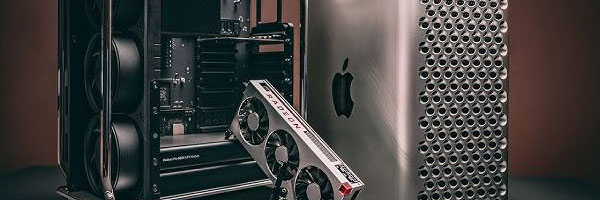
Expand Performance, Storage, and Graphics Without Replacing Your System

⚙️ Your Mac Pro was built to evolve, not to be replaced.

Apple designed the Mac Pro as a modular workstation for professionals who outgrow default configurations. As workloads become heavier and software more demanding, strategic hardware upgrades can dramatically extend the life and performance of your system.

We focus on safe, compatible Mac Pro hardware upgrades that increase speed, capacity, and efficiency while preserving macOS stability and existing workflows.


Mac Pro Hardware Upgrade Options

All upgrades are planned around how the system is actually used, not generic benchmarks.

🧠 Memory (RAM) Expansion

  • Increase memory capacity for heavy multitasking and real-time workloads
  • Support for large project files, virtualization, and rendering
  • Stability testing with macOS and professional applications

💾 Storage Upgrades and Expansion

  • Install high-speed internal SSDs or NVMe storage
  • Expand total capacity for media libraries and project archives
  • RAID configurations for speed, redundancy, or backup strategies

🎮 Graphics and MPX Module Upgrades

  • GPU upgrades for rendering, video editing, 3D, and compute tasks
  • Support for AMD Radeon Pro MPX modules and compatible PCIe GPUs
  • External GPU (eGPU) configuration when applicable

🔌 PCIe and I/O Expansion

  • Audio, video, capture, and networking expansion cards
  • Thunderbolt, USB-C, and high-speed data interfaces
  • 10GbE networking for shared storage and studio environments

❄️ Thermal and Performance Optimization

  • Airflow evaluation and fan behavior optimization
  • Thermal paste replacement where beneficial
  • Quiet operation under sustained load

Why Hardware Upgrades Make Sense

💸 Extend the life of an expensive professional workstation
🧩 Avoid software migrations and workflow disruptions
💼 Scale performance as project demands grow
🌱 Reduce electronic waste by maximizing existing hardware

The Mac Pro’s modular design exists for this exact purpose. Strategic upgrades can keep it competitive for years.


Supported Mac Pro Systems

Hardware upgrades are available for:

  • Mac Pro Tower (2019 Intel)
  • Mac Pro Cylinder (2013)
  • Apple Silicon Mac Pro systems, including M2 Ultra
  • Custom configurations with PCIe cards, RAID, and expansion modules

Each upgrade is evaluated for compatibility, thermal limits, and macOS support before installation.


Why Professionals Trust This Approach

  • Experience with high-performance Mac Pro configurations
  • Careful component selection to avoid instability
  • Full system testing after every upgrade
  • Data-safe procedures that protect existing installations
  • Honest guidance focused on real performance gains

Upgrades are done with the mindset that downtime is costly and mistakes are unacceptable.


Mac Pro Upgrade Services Available Locally

Hardware upgrades are available for individual professionals, studios, and businesses throughout the Miami area, with options for in-store service, pickup and delivery, or on-site support depending on the setup.


Schedule a Mac Pro Hardware Upgrade

If your Mac Pro is being held back by memory limits, slow storage, or outdated graphics, an upgrade can unlock performance without replacing the entire system. A proper evaluation ensures the right components are installed for long-term reliability.

Mac Pro Graphics and GPU Repair in Miami

Professional GPU Diagnostics and Graphics Hardware Restoration

🎥 Display issues on a Mac Pro are rarely random.

The Mac Pro is built for demanding visual workloads, but when graphics hardware begins to fail, symptoms can escalate quickly. Distorted visuals, black screens, application crashes, or instability during GPU-intensive tasks usually indicate a problem with the graphics card, video circuitry, or thermal system.

This service focuses on accurately diagnosing GPU-related failures and restoring reliable graphics performance using Mac-compatible components and professional repair techniques.


Common Mac Pro Graphics Issues

⚫ No display or black screen at startup
🧊 Visual artifacts, flickering, or corrupted output
🔁 System restarts during rendering or video playback
🔥 Overheating or fans running at maximum speed
💥 Kernel panics triggered by graphics processes
🖥️ External monitors not detected or unstable

Graphics problems can stem from failing GPUs, degraded VRAM, loose connections, thermal stress, or macOS driver conflicts. Proper diagnostics determine the real cause before any repair decision is made.


Mac Pro GPU and Video Repair Process

Each repair is performed using workstation-grade tools and controlled testing procedures.

Step 1: GPU and Thermal Diagnostics
The graphics card is stress-tested while monitoring temperatures, power draw, and display output to determine whether the issue is hardware- or software-related.

Step 2: Repair or Replacement Evaluation
When possible, component-level repairs are attempted. If the GPU is beyond repair, compatible replacement options are recommended based on workload requirements and macOS support.

Step 3: System Validation and Optimization
After repair or replacement, the system is tested across internal and external displays, rendering workloads, and professional applications to ensure stable performance.


GPU Upgrade Options (Optional)

In some cases, repair is a good opportunity to improve performance.

Available options may include:

  • AMD Radeon Pro GPU upgrades for supported Mac Pro towers
  • MPX module installation for enhanced graphics performance
  • External GPU (eGPU) configuration where supported
  • Multi-GPU optimization for rendering or compute workflows

All upgrades are evaluated for thermal limits, power requirements, and software compatibility.


Supported Mac Pro Configurations

Graphics repairs and upgrades are available for:

  • Mac Pro (2013 cylindrical model)
  • Mac Pro (2019 Intel tower)
  • Apple Silicon Mac Pro systems with dedicated graphics configurations
  • Systems using MPX modules or third-party PCIe GPUs
  • External eGPU setups paired with Mac Pro

Whether used for video editing, 3D rendering, motion graphics, or compute-heavy workflows, each system is evaluated individually.


Why This Repair Approach Matters

  • Accurate diagnostics prevent unnecessary part replacements
  • Repairs preserve existing system configurations and data
  • Performance testing ensures real-world stability
  • Mac-compatible components avoid driver and OS issues

Graphics failures are disruptive, especially in production environments. The goal is to restore reliability, not just power the system back on.


Mac Pro Video Repair Support Available Locally

Mac Pro GPU and video repairs are available for professionals, studios, and businesses throughout the Miami area, with options for in-shop service, pickup and delivery, or on-site support depending on system configuration.


Schedule a Mac Pro Graphics Diagnostic

If your Mac Pro is showing display issues, struggling under GPU load, or crashing during graphics-intensive tasks, a professional diagnostic can determine whether repair or replacement is the right path forward.