
MacBook Air Screen Repair and Replacement in Miami

Accurate Display Replacement with Careful, Model-Specific Installation

A MacBook Air screen problem affects more than visuals, it disrupts work, communication, and daily use. Cracked glass, unstable brightness, flickering images, or a display that stays dark even while the system is running are all signs that the screen assembly or its supporting components need attention.

Screen issues are handled through careful inspection and precise repair decisions, whether that means replacing the display assembly or addressing related hardware that affects image output.


Screen Issues Commonly Seen on MacBook Air

Display problems can present themselves in different ways, including:

  • Cracked or shattered glass
  • Lines, flickering, or uneven brightness
  • Discoloration or washed-out colors
  • Black screen while the keyboard and trackpad remain responsive
  • Backlight failure or shadowed areas
  • Image ghosting or persistent artifacts

Each symptom is examined individually to avoid unnecessary replacements and to ensure the correct fix is applied.


How Screen Repairs Are Handled

Display and Signal Testing

The display, internal connectors, and video output paths are tested to confirm whether the issue is isolated to the screen or connected to another component.

Screen Assembly Replacement

When replacement is required, the correct panel is installed based on your exact MacBook Air model, resolution, and generation.

Controlled Installation

The screen is installed in a clean environment to reduce dust intrusion and ensure proper alignment, fit, and sealing.

Visual Accuracy Checks

Brightness consistency, resolution, color balance, and overall stability are verified before the device is returned.


MacBook Air Models Covered

Screen repairs are available for:

  • Apple Silicon MacBook Air models
  • Retina MacBook Air systems
  • Intel-based MacBook Air generations

Each repair is matched to the correct screen specifications to avoid compatibility or quality issues.


Service Availability

Support is available for MacBook Air owners throughout Miami-Dade County. Logistics are handled in a way that fits around work schedules and daily routines rather than disrupting them.


When a Screen Issue Should Be Addressed

Display damage rarely improves on its own. Small cracks can spread, backlight issues can worsen, and unstable visuals can place strain on internal components. Addressing the problem early helps avoid secondary damage and preserves usability.

If your MacBook Air screen is no longer clear, stable, or usable, a proper repair can return the device to dependable daily operation.
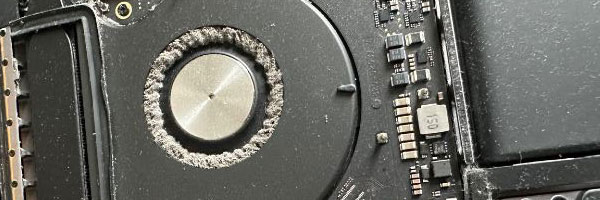
MacBook Air Cleaning and Maintenance Services in Miami

Thermal Care and System Upkeep for Consistent Performance

MacBook Air systems are designed to run quietly and efficiently, but over time dust accumulation, aging thermal materials, and background software clutter can interfere with that balance. Rising temperatures, fan noise, and gradual slowdowns are often signs that internal maintenance is overdue.

Routine cleaning and system care help keep components operating within safe ranges, reduce strain on internal hardware, and maintain the smooth responsiveness users expect from a MacBook Air.


What’s Addressed During Maintenance

Internal Cleaning and Airflow Care

The system is carefully opened to remove accumulated dust from fans, vents, and internal airflow paths. Clearing these areas helps stabilize temperatures and reduces unnecessary fan activity.

Thermal Material Refresh

Old thermal compound is removed and replaced where applicable to improve heat transfer between internal processors and cooling surfaces. This helps manage temperature spikes during daily workloads.

Battery and Connection Check

Battery condition, charge behavior, and visible swelling risks are reviewed. Ports and connectors are cleaned to ensure consistent power delivery and reliable device connections.

macOS Performance Review

Temporary files, excessive background processes, and outdated software elements are addressed to reduce unnecessary system load and improve overall responsiveness.

System Stability Verification

Fan behavior, operating temperatures, storage performance, and general system health are reviewed before completion.


Compatible MacBook Air Models

Maintenance services are available for:

  • Intel-based MacBook Air systems
  • Apple Silicon MacBook Air models
  • 11-inch, 13-inch, and 15-inch configurations

Support covers a wide range of macOS versions and usage environments, from casual daily use to constant work sessions.


When Maintenance Is Worth Scheduling

  • Fans running more often than expected
  • The system feels warm during light tasks
  • Gradual performance decline over time
  • The device hasn’t been cleaned internally in over a year
  • Daily use for work, school, or creative projects

Preventative care reduces the chance of sudden failures and helps extend the useful life of the system.


Service Area and Availability

Support is available throughout Miami-Dade County, with service options arranged to minimize disruption to daily routines. Devices are handled carefully, tested thoroughly, and returned ready for regular use.


Keep Your MacBook Air Running Smoothly

Cleaning and maintenance aren’t about fixing something broken, they’re about keeping a reliable system dependable. If your MacBook Air is running warmer, louder, or slower than it used to, a proper internal refresh can make a noticeable difference.

📞 305-600-4217
🕘 Monday through Sunday, 9:00 AM to 7:00 PM