MacBook Pro WiFi and Wireless Connectivity Repair in Miami
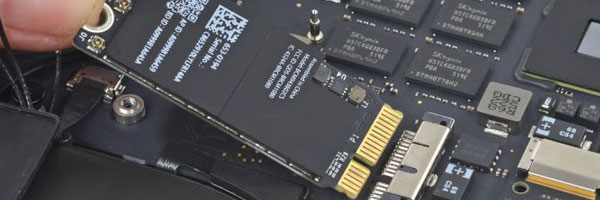
Wireless Connectivity Diagnostics and Repair

A MacBook Pro that struggles to connect to Wi-Fi can interrupt work, communication, and daily tasks. Wireless issues may appear suddenly or develop over time due to hardware wear, software conflicts, or internal signal problems. Wi-Fi repair focuses on identifying the exact cause of connectivity failure and restoring stable network performance.

This service addresses both intermittent and complete wireless failures.


Common Wi-Fi and Wireless Symptoms

Wi-Fi networks not appearing
Connection drops during normal use
Very weak signal even near the router
Extremely slow internet speeds on a known fast network
Wi-Fi marked as unavailable or disabled
System reporting missing wireless hardware
Bluetooth or AirDrop also failing to function

Many of these symptoms originate from shared wireless components inside the MacBook Pro.


How Wi-Fi Issues Are Diagnosed

Wireless problems can stem from several layers of the system. The diagnostic process examines:

Wireless card functionality
Internal antenna cables and signal routing
macOS network configuration and system profiles
Firmware and low-level controller behavior
Logic board communication with wireless components

This ensures the issue is identified correctly before any repair is performed.


Repair and Correction Methods

Software and Configuration Correction
Network settings, system profiles, and firmware parameters are reviewed and corrected when the issue is software based.

Antenna and Signal Path Repair
Damaged or disconnected antenna components can severely reduce signal strength and stability. These are repaired or replaced as needed.

Wireless Hardware Replacement
If the internal Wi-Fi module has failed, it is replaced with a model-specific component designed for the exact MacBook Pro configuration.

Board-Level Repair (When Applicable)
On models where the wireless chipset is integrated into the logic board, repair may involve precision board-level work depending on failure type and feasibility.


Supported MacBook Pro Models

Intel-based MacBook Pro systems
Apple Silicon MacBook Pro models
Retina and Touch Bar configurations
13-inch, 14-inch, 15-inch, and 16-inch variants

Wireless architecture varies by generation, and repair options are matched accordingly.


Request Wi-Fi Repair Assistance

If your MacBook Pro is experiencing unreliable or missing wireless connectivity, you can request an evaluation using the contact us page. Providing details about the symptoms and when they started helps determine the most effective repair approach.
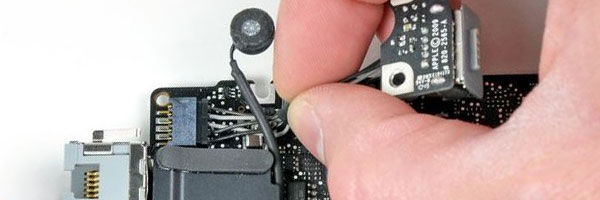
MacBook Pro DC Jack and Charging Port Repair in Miami

Charging Port Diagnostics and Power Repair

A MacBook Pro that will not charge reliably often points to a failing DC jack or charging port. Power interruptions, loose connections, or complete charging failure can occur gradually or suddenly, depending on wear, internal damage, or electrical stress. DC jack repair focuses on restoring stable power delivery to prevent shutdowns, battery drain, and system instability.

This service addresses both MagSafe and USB-C charging systems.


Common Charging and Power Symptoms

MacBook Pro does not charge when connected
Charging works only at certain cable angles
Intermittent power loss during normal use
Loose or unstable charging connector
System does not recognize external power
Battery drains even while plugged in
Overheating or electrical smell near the port

Charging issues can originate at the port itself or deeper within the power delivery circuit.


How Charging Problems Are Diagnosed

Power-related issues require careful isolation. Diagnostics examine:

Charging port physical condition
Internal DC jack connections and solder points
Power rails and voltage regulation
Battery communication with the logic board
System response to external power input

This process ensures the correct component is addressed before any repair is performed.


DC Jack and Charging Port Repair Methods

Charging Port Replacement
Physically damaged or worn ports are removed and replaced with model-specific components designed for proper fit and electrical tolerance.

Internal Power Circuit Repair
If charging failure originates beyond the port, repairs may involve restoring damaged traces or components along the power input path.

Connector and Cable Line Restoration
Loose or compromised internal connectors are repaired to ensure consistent current flow and secure attachment.

Post-Repair Power Validation
After repair, charging behavior, power stability, and battery recognition are tested under normal operating conditions.


Supported MacBook Pro Models

MagSafe-based MacBook Pro systems
USB-C and Thunderbolt charging models
Intel-based MacBook Pro generations
Apple Silicon MacBook Pro systems
13-inch, 14-inch, 15-inch, and 16-inch models

Charging architecture varies by generation, and repair methods are matched accordingly.


Request DC Jack Repair Assistance

If your MacBook Pro is experiencing charging instability or power connection issues, you can request an evaluation using the contact us page. Providing details about the symptoms and when they began helps determine the appropriate repair approach.