
MacBook Pro Cleaning and Maintenance Services in Miami

Thermal Management, Internal Cleaning, and Performance Preservation

Over time, MacBook Pro systems accumulate internal dust, thermal residue, and background inefficiencies that directly affect temperature control, fan behavior, and overall performance. Excess heat, loud fans, and slow responsiveness are often signs that routine maintenance is overdue rather than indicators of hardware failure.

MacBook Pro cleaning and maintenance focuses on restoring proper airflow, stabilizing operating temperatures, and ensuring the system runs efficiently under normal and sustained workloads.

What Cleaning and Maintenance Addresses

Routine service is recommended when a MacBook Pro shows:

  • Excessive fan noise during light or moderate use
  • Higher than normal operating temperatures
  • Thermal throttling and performance drops
  • Slow system response despite adequate hardware
  • Dust buildup affecting vents or airflow
  • Aging thermal compound reducing heat transfer

These conditions, if ignored, can shorten component lifespan and lead to preventable repairs.

Maintenance Scope and Procedure

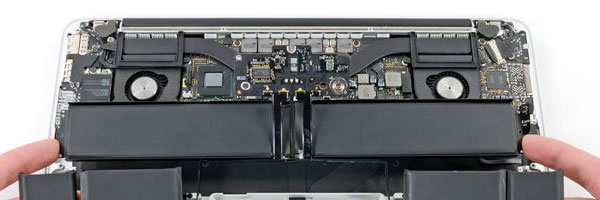
Cleaning begins with careful internal access to remove accumulated dust from fans, vents, heatsinks, and surrounding components. Thermal compound on the processor and graphics system is evaluated and replaced when degraded to restore efficient heat dissipation.

System-level maintenance includes verification of fan behavior, temperature stability, and removal of unnecessary background load that contributes to heat buildup. The goal is not cosmetic cleaning but long-term operational stability.

Supported MacBook Pro Models

Cleaning and maintenance applies to all MacBook Pro generations, including:

  • Intel-based MacBook Pro models
  • Apple Silicon systems including M1 and M2
  • 13-inch, 14-inch, and 16-inch configurations
  • Retina display and Touch Bar variants
  • Systems using MagSafe, USB-C, or Thunderbolt power

Each model is serviced according to its internal cooling architecture and thermal design.

Why Preventive Maintenance Matters

Thermal stress is one of the primary causes of logic board degradation, fan failure, and unexpected shutdowns. Regular maintenance reduces strain on internal components, preserves consistent performance, and helps avoid unnecessary part replacement.

For convenience, pickup and return delivery can be arranged within Miami-Dade County when needed.


📞 305-600-4217
🕘 Monday to Sunday, 9:00 AM to 7:00 PM

MacBook Pro Diagnostics and Repair in Miami

System-Level Analysis and Fault Identification

When a MacBook Pro begins to malfunction, the symptoms often overlap across hardware and software. Power issues, display failures, performance drops, and boot problems can originate from multiple subsystems. A proper diagnostic process is essential to identify the true source of the failure before any repair is attempted.

MacBook Pro repair diagnostics focus on isolating faults at the component, system, and software levels to prevent unnecessary part replacement and ensure accurate repair decisions.

What Diagnostic Evaluation Covers

A complete diagnostic assessment is designed to identify issues related to:

  • Power delivery and startup behavior
  • Battery health and charging response
  • Display output and backlight functionality
  • Keyboard, trackpad, and input communication
  • Storage integrity and memory stability
  • Thermal behavior and fan operation

These checks help distinguish between logic board faults, peripheral failures, storage issues, or operating system corruption.

Logic Board and Hardware Inspection

When symptoms indicate deeper failure, diagnostics extend to logic board evaluation. This includes voltage rail verification, inspection for liquid intrusion, component degradation, and communication failures between critical chips such as power controllers, GPUs, and storage interfaces.

Identifying board-level faults early helps determine whether repair, rework, or replacement is the most practical path forward.

Software and System Integrity Review

Diagnostic work also evaluates macOS stability, boot processes, and system logs. Kernel panics, startup loops, and application crashes are analyzed to determine whether the issue is software-based or triggered by underlying hardware instability.

This step ensures that software recovery is not attempted when a hardware fault is present, and vice versa.

Supported MacBook Pro Models

Diagnostic services apply to all MacBook Pro generations, including:

  • Intel-based MacBook Pro systems
  • Apple Silicon models including M1 and M2
  • 13-inch, 14-inch, 15-inch, and 16-inch configurations
  • Retina display and Touch Bar variants

Each model is evaluated according to its internal architecture and known failure patterns.

For convenience, pickup and return delivery can be arranged within Miami-Dade County when needed.


📞 305-600-4217
🕘 Monday to Sunday, 9:00 AM to 7:00 PM