
Computer Air Cooling vs Liquid Cooling

Air Cooling VS Liquid Coolingt

Computer Repair Miamis – Air Cooling vs. Liquid Cooling

When it comes to keeping your computer running efficiently, proper cooling is essential. Most computers rely on air cooling, but high-performance setups may require liquid cooling for optimal thermal management. At our computer repair center in Miami, we specialize in diagnosing and optimizing cooling systems to ensure your computer stays at peak performance.

Air Cooling: How It Works

Air cooling is the standard method used in most desktops and laptops. The process involves heat sinks and fans working together to dissipate heat from critical components like the CPU and GPU. Here’s how it works:

  • Heat Sinks: The CPU and GPU have metal heat sinks attached to draw heat away.

  • Cooling Fans: Fans move air over the heat sinks, expelling the heat out of the case.

  • Airflow Optimization: Proper case ventilation is necessary to prevent heat buildup.

Modern air coolers often feature enhanced designs, such as radiator-style heat sinks with side-mounted fans to improve airflow efficiency. High-end air cooling solutions use copper heat plates and high-CFM (Cubic Feet per Minute) fans to increase heat dissipation.

Liquid Cooling: The Advanced Solution

For extreme performance and overclocking, liquid cooling is a superior option. Instead of relying solely on air, liquid cooling systems use coolant to transfer heat away from components. Here’s how liquid cooling works:

  • Coolant Circulation: Liquid absorbs heat from the CPU and transfers it through tubes.

  • Radiators & Fans: The heated liquid moves to a radiator, where fans dissipate the heat.

  • Improved Efficiency: Liquid cooling allows for lower temperatures and quieter operation compared to air cooling.

Liquid cooling is ideal for gaming PCs, workstations, and high-performance builds, as it prevents thermal throttling and extends the lifespan of components.

Importance of Thermal Paste in Cooling

To maximize heat transfer, thermal paste is applied between the CPU and the heat sink. This compound fills microscopic gaps, ensuring efficient heat dissipation. When applying thermal paste:

  • Use a small amount in the center of the CPU.

  • Allow the pressure from the heat sink to spread the compound evenly.

  • Avoid excessive application to prevent leakage.

Choosing the Right Cooling System for Your PC

The choice between air and liquid cooling depends on several factors: ✔ Air Cooling – Best for budget-friendly builds and standard computing tasks. ✔ Liquid Cooling – Ideal for overclocked processors, high-end gaming, and performance rigs. ✔ Hybrid Solutions – Combining air and liquid cooling for ultimate heat management.

Expert Cooling Solutions & PC Repair in Miami

If your computer is overheating, making loud fan noises, or shutting down unexpectedly, it may be time for a cooling system upgrade. Our computer repair services in Miami include:

  • CPU & GPU Cooling System Repairs

  • Fan & Heat Sink Cleaning & Replacement

  • Thermal Paste Application

  • Liquid Cooling System Installation & Maintenance

  • Overheating Diagnostics & Prevention

Get Professional Cooling Solutions Today!

Don’t let overheating slow down your PC! Visit our computer repair shop in Miami for expert cooling system upgrades and maintenance.

Call Us: (305) 600-4217

Stay Cool, Stay Fast – Upgrade Your PC Cooling Today!
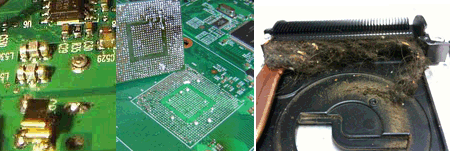
Signs of Laptop Motherboard Failure

motherboard_failures

Signs of Laptop Motherboard Failure – Expert Laptop Motherboard Repair in Miami

Are you experiencing strange issues with your laptop, such as random shutdowns, failure to boot, or no power at all? These could be signs of laptop motherboard failure. At our Laptop Motherboard Repair in Miami service center, we specialize in diagnosing and fixing motherboard issues to restore your laptop’s functionality.

Common Signs of Laptop Motherboard Failure

Recognizing the symptoms early can prevent further damage and data loss. Here are the most common signs that your laptop motherboard may be failing:

  • Laptop Won’t Turn On – No power, no lights, and no response when pressing the power button.
  • Frequent System Crashes & Freezing – Your laptop randomly crashes or freezes, even after reinstalling the operating system.
  • Overheating Issues – The laptop gets extremely hot, even with proper ventilation, due to motherboard component failure.
  • Beeping Sounds at Startup – Unusual beep codes during startup indicate motherboard failure or related hardware issues.
  • No Display on the Screen – The laptop powers on, but the screen remains black or flickers intermittently.
  • Laptop Shuts Down Randomly – Your device turns off unexpectedly, even when the battery is charged and the charger is connected.
  • USB & Port Failures – Non-functioning USB ports, audio jacks, or other ports due to motherboard circuit failures.
  • Charging Issues – Laptop doesn’t charge properly or fails to detect the charger.
  • Burning Smell or Visible Damage – A burnt smell or visible damage on the motherboard (such as swollen capacitors) is a major sign of failure.

Our Laptop Motherboard Repair Services in Miami

We offer comprehensive motherboard repair solutions to get your laptop back in working condition:

Laptop Motherboard Diagnosis – In-depth testing to pinpoint motherboard issues. ✔ Chip-Level Repair & Component Replacement – Fixing faulty ICs, capacitors, and resistors. ✔ Power Supply & Circuit Repair – Resolving power-related failures and short circuits. ✔ Overheating & Thermal Management Solutions – Replacing thermal paste, cooling components, and ensuring proper airflow. ✔ BIOS & Firmware Repair – Updating or reprogramming corrupted firmware for proper boot functionality. ✔ Charging Port & Power Jack Repair – Fixing power issues related to faulty charging ports. ✔ Liquid Damage Motherboard Repair – Restoring motherboards affected by spills or moisture. ✔ Data Recovery from Damaged Motherboards – Retrieving important files before repair or replacement.

Why Choose Us for Laptop Motherboard Repair in Miami?

  • Experienced & Certified Technicians – Skilled in repairing all major laptop brands, including Dell, HP, Lenovo, ASUS, Acer, Apple MacBook, and more.
  • Fast & Reliable Repairs – Quick turnaround times to minimize downtime.
  • Affordable & Transparent Pricing – Competitive rates with no hidden fees.
  • High-Quality Replacement Parts – Ensuring long-lasting repairs with genuine or OEM components.
  • Warranty on Repairs – Providing peace of mind with our service guarantee.
  • Convenient Miami Location – Easily accessible for drop-offs and pickups.

How Our Laptop Motherboard Repair Process Works

  1. Visit Our Miami Repair Shop – Walk in or schedule an appointment online.
  2. Free Diagnosis & Quote – We assess your laptop’s motherboard issue and provide a detailed estimate.
  3. Expert Repair & Testing – Our technicians carefully repair the motherboard with advanced tools.
  4. Final Testing & Pickup – Ensuring your laptop functions optimally before returning it to you.

Get Your Laptop Motherboard Fixed Today!

If you suspect motherboard failure, don’t wait—bring your laptop to our Laptop Motherboard Repair in Miami experts today. We’ll diagnose and fix your laptop quickly, ensuring it runs like new again.

Call Us: (305) 600-4217

Reliable Repairs. Expert Technicians. Affordable Pricing. Get your laptop motherboard repaired today!