
MacBook Air Charging Port Repair in Miami

Resolving Charging Port and Power Connection Failures

Charging problems on a MacBook Air are often caused by wear or damage at the DC jack, also known as the charging port. When power only connects at certain angles, disconnects randomly, or fails entirely, the issue may involve the port itself, internal connectors, or charging circuitry on the logic board.

This service focuses on accurately diagnosing charging failures and restoring stable, reliable power without unnecessary part replacement.


Common Signs of DC Jack Failure

Charging related issues may include:

  • MacBook Air does not charge at all
  • Power connects only when the cable is held or positioned carefully
  • Charging indicator does not appear on MagSafe or USB C
  • Known good charger works on other devices but not this system
  • Loose, unstable, or overheated charging port
  • Battery continues to drain while plugged in

These symptoms usually indicate a failing DC jack or related power circuitry and should be addressed before complete battery depletion occurs.


DC Jack Repair Process

Diagnostic Evaluation

The system is tested with verified chargers and inspected internally to determine whether the issue originates from the DC jack, internal cable, power controller, or logic board.

Charging Port Replacement

If the port is physically worn, damaged, or unstable, it is replaced with a model matched MagSafe or USB C charging port designed for the specific MacBook Air generation.

Board Level Power Repair

In cases involving shorted components or charging controller faults, component level solder repairs are performed using precision tools and microscopic inspection.

Power Stability Testing

After repair, the system is tested under sustained charging conditions to confirm consistent voltage delivery and safe operation.


Supported MacBook Air Models

Charging port repairs are available for:

  • MacBook Air with M1 and M2 processors using USB C
  • MacBook Air Retina models
  • Intel based MacBook Air systems using MagSafe
  • Both MagSafe 1 and MagSafe 2 generations

Each repair is matched to the exact model and year to ensure compatibility and reliability.


Why Proper Diagnosis Matters

Charging issues are often misattributed to batteries or adapters. Accurate diagnosis prevents unnecessary replacements and ensures the real cause is corrected.

  • Prevent repeated charging failures
  • Protect logic board and battery health
  • Restore long term charging reliability

Pickup and Delivery Availability

Pickup and return delivery can be arranged within Miami-Dade County when needed.


Schedule a Charging Port Evaluation

If your MacBook Air is experiencing charging problems or unstable power connection, a professional evaluation can determine whether the DC jack or related circuitry requires repair.

Early intervention helps avoid additional power related damage and restores dependable daily use.
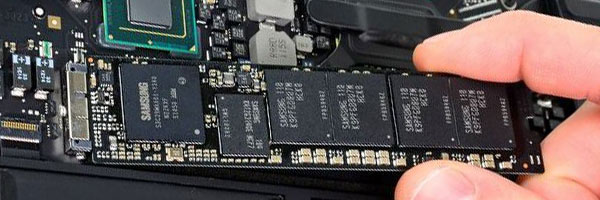
MacBook Air Hard Drive and SSD Replacement in Miami

Improving Speed, Reliability, and Storage Capacity

When a MacBook Air becomes slow, unresponsive, or unable to boot, the internal storage is often the root cause. Aging drives, limited capacity, or failing solid state storage can severely impact system performance and stability.

This service focuses on restoring reliability and improving performance through proper storage evaluation, replacement, or upgrade, based on the exact MacBook Air model and its technical limitations.


Signs the Internal Drive May Need Replacement

Storage related issues often present as:

  • Long startup times or delayed application launches
  • Frequent freezing or system crashes
  • Disk Utility reporting errors or SMART warnings
  • macOS failing to load or stalling during startup
  • Persistent “startup disk full” messages
  • Corrupted files or repeated application failures

Addressing these symptoms early can prevent permanent data loss and extend the usable life of the system.


Drive Replacement and Upgrade Process

Storage Evaluation

The existing drive is assessed to confirm failure, degradation, or capacity limitations. Model compatibility is verified before any recommendation is made.

SSD Installation or Replacement

Where supported, a new solid state drive is installed to improve speed, reduce heat, and increase long term reliability. Drive type and capacity are selected based on the specific MacBook Air generation.

macOS Installation and Configuration

A clean installation of the latest compatible macOS is performed and optimized for the new storage device.

Data Transfer or Recovery Options

If the original drive is accessible, files, applications, and user settings can be transferred. When drives are partially failed, recovery options are evaluated before replacement.

Final Testing

The system is tested for stability, storage performance, and overall responsiveness before completion.


Storage Capacity Options

Common upgrade paths include:

  • 256 GB for basic daily use
  • 512 GB for work and multitasking environments
  • 1 TB or higher for media, development, or professional workloads

Capacity recommendations are based on current usage and expected future needs.


Supported MacBook Air Models

Service availability varies by generation:

  • Intel based MacBook Air systems with removable PCIe storage
  • Retina models with limited storage replacement paths
  • Apple Silicon models where storage diagnostics and data migration are possible

Each system is evaluated individually to determine the most appropriate solution.


Pickup and Delivery Availability

Pickup and return delivery can be arranged within Miami-Dade County when needed.


Schedule a Storage Evaluation

If your MacBook Air is slow, unstable, or running out of space, a professional storage evaluation can determine whether replacement or upgrade is appropriate.

Correcting storage issues restores speed, stability, and confidence in daily use while protecting important data.