
MacBook Pro Video Repairs
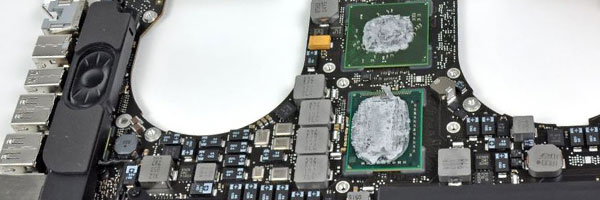
Graphics Failure Diagnosis and Board-Level Repair
Video problems on a MacBook Pro are rarely just display issues. Visual artifacts, sudden freezes, black screens, and crashes during normal use often point to failures in the graphics processor, video memory, or supporting logic board circuits. These issues are especially common in certain Intel-based models, but can also occur in newer systems under thermal or electrical stress.
This service focuses on identifying and correcting the underlying cause of video and GPU-related failures rather than replacing parts blindly.
Common Video and GPU Failure Symptoms
System powers on but no image appears
Screen shows lines, blocks, or color distortion
System freezes during graphics-intensive tasks
Crashes when waking from sleep
External displays fail or behave erratically
Repeated kernel panics related to graphics processes
Performance drops when rendering or decoding video
These symptoms often worsen over time if left unresolved.
Video System Diagnostic Process
Before any repair is attempted, the entire video subsystem is evaluated, including:
Graphics processor behavior under load
Video memory stability
Power delivery to GPU circuits
Thermal response and heat distribution
Logic board signal integrity
This ensures the issue is correctly identified as a GPU, video circuit, or related board-level fault.
GPU and Video Repair Options
Graphics Chip Rework
For models affected by solder joint degradation, controlled reflow or reballing procedures may be used to restore reliable connections between the GPU and logic board.
Component-Level Circuit Repair
Faulty power controllers, capacitors, resistors, or signal components related to video output can be repaired or replaced directly on the board.
Thermal System Correction
Cooling inefficiencies contribute heavily to GPU failure. Fans, heatsinks, and thermal interfaces are addressed to reduce recurrence risk.
Display Output Verification
Internal and external video outputs are tested after repair to confirm stable image rendering and resolution handling.
Supported MacBook Pro Systems
Intel-based MacBook Pro models with integrated or discrete graphics
Models affected by known GPU reliability issues
13-inch, 15-inch, and 16-inch configurations
Retina and non-Retina designs
Apple Silicon systems are evaluated individually due to integrated graphics architecture.
When to Request Video Evaluation
If your MacBook Pro shows visual instability, crashes under normal workloads, or produces no image despite powering on, a proper video diagnostic can prevent unnecessary screen replacement and reduce the risk of data loss or further board damage.
Requests for evaluation can be submitted using the contact us page.
© 2011-2026 Computer Repair Miamis . All Rights Reserved.


