
• Home |
  • SITEMAP
Computer Repair Miamis logo
  • DESKTOP
    • Desktop Data Recovery
  • LAPTOP
    • LAPTOP DATA RECOVERY
  • MAC REPAIR
    • MAC DATA RECOVERY
    • iPHONE
  • Services
  • Areas we Serve
  • BLOG
  • CONTACT US
    • SITEMAP
    • FREE DELIVERY
  • Home
  • » Mac Services » MacBook Air Liquid Damage Repairs

MacBook Air Liquid Damage Repairs
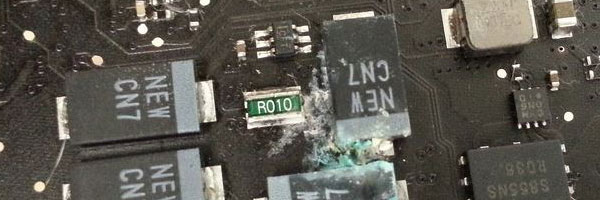
Professional Cleaning and Component-Level Recovery

Liquid spills are one of the most serious threats to a MacBook Air. Water, coffee, soda, or juice can quickly reach internal components and begin causing corrosion, even if the system appears to work at first. Proper liquid damage repair focuses on stopping corrosion early, cleaning affected circuits, and repairing damaged components before failures spread.

This service is designed to restore functionality whenever possible and protect both your hardware and your data.


What to Do Immediately After a Spill

If liquid has contacted your MacBook Air, take action right away:

  • Power the device off immediately
  • Disconnect the charger and any accessories
  • Do not attempt to dry it with heat or turn it back on
  • Seek professional evaluation as soon as possible

Speed matters. Corrosion can begin within hours, even when the device looks dry on the outside.


Liquid Damage Repair Process

Internal Inspection and Disassembly

The MacBook Air is carefully opened and all internal components are inspected for moisture, residue, or corrosion. This allows us to determine how far the liquid has spread.

Logic Board Cleaning

Specialized ultrasonic cleaning is used to remove mineral deposits and contaminants from the logic board and internal circuits. This step is critical for stopping ongoing corrosion.

Component-Level Repairs

If individual chips or circuits are damaged, repairs are performed at the board level using micro-soldering techniques and proper replacement components.

Peripheral and Power Component Evaluation

Keyboards, trackpads, batteries, speakers, and connectors are tested and replaced only if liquid damage has compromised their function.

Full System Testing

After reassembly, the system is tested for power stability, charging, display output, ports, audio, and thermal behavior to confirm reliable operation.


Supported MacBook Air Models

Liquid damage service is available for:

  • MacBook Air with Apple Silicon M1 and M2
  • MacBook Air Retina models
  • Intel-based MacBook Air systems
  • All storage and logic board configurations

Both minor spills and severe liquid exposure can be evaluated.


Why This Approach Matters

Liquid damage repair is not about quick drying or surface cleaning. It requires proper tools, patience, and experience with Apple hardware design.

  • Component-level focus instead of guesswork
  • Corrosion prevention, not temporary fixes
  • Data-safe handling throughout the process
  • Clear evaluation before repairs proceed
  • No unnecessary part replacement

The goal is long-term reliability, not short-term recovery.


Pickup and Delivery Availability

For convenience, pickup and return delivery can be arranged within Miami-Dade County when needed.


Schedule a Liquid Damage Evaluation

If liquid has contacted your MacBook Air, delaying service can reduce the chances of recovery. A professional assessment can determine whether cleaning, repair, or data protection is still possible.

Early action gives the best outcome.

Comments are closed.

Geek Corners

  • Detecting if your gaming laptop requires air cleaning maintenance April 12, 2025
  • The Best Practices for Building a Custom Gaming PC April 11, 2025
  • Mistakes to avoid when trying to repair a liquid damaged pc April 10, 2025
  • Enhance the performance of your gaming PC for streaming April 8, 2025
  • Identifying the causes of slow laptop performance April 6, 2025
  • Home Services April 4, 2025
  • Wiring Installation April 3, 2025
  • Security Cameras April 1, 2025
  • Wired and Wireless Network Mar 28, 2025
  • Data Recovery Mar 27, 2025
  • Game Console Diagnostic Mar 25, 2025
  • Drone Repairs Mar 23, 2025
  • Microsoldering Services Mar 22, 2025
  • Tablet Diagnostic Mar 21, 2025
  • iPhone Repairs Mar 20, 2025
  • Mac Pro Power Supply Repairs Mar 18, 2025
  • Mac Pro Data Transfer Mar 15, 2025
  • Mac Pro Data Recovery Mar 14, 2025
  • Mac Pro Software Configuration Mar 13, 2025
  • Mac Pro Logic Board Repairs Mar 12, 2025
  • Mac Pro Hardware Upgrades Mar 10, 2025
  • Mac Pro Video Repairs Mar 8, 2025
  • Mac Pro Hard Drive Replacement Mar 7, 2025
  • Mac Pro Cleaning and Maintenance Mar 4, 2025
  • Mac Pro Repair Diagnostic Mar 3, 2025
  • Desktop Computer Data Recovery Mar 2, 2025
  • Desktop Computer Data Transfer Mar 1, 2025
  • Desktop Computer Software Configuration Mar 1, 2025
  • Desktop Computer Hardware Upgrades Feb 27, 2025
  • Desktop Computer Motherboard Repairs Feb 25, 2025
  • Desktop Computer Hard Drive Replacement Feb 24, 2025
  • Desktop Computer Cleaning and Maintenance Feb 23, 2025
  • Desktop Computer Repair Diagnostic Feb 21, 2025
  • All-in-One Computer Data Recovery Feb 18, 2025
  • All-in-One Computer Data Transfer Feb 17, 2025
  • All-in-One Software Configuration Feb 16, 2025
  • All-in-One Computer Hardware Upgrades Feb 14, 2025
  • All-in-One Computer Motherboard Repairs Feb 13, 2025
  • All-in-One Computer Hard Drive Replacement Feb 11, 2025
  • All-in-One Computer Power Supply Repairs Feb 10, 2025
  • All-in-One Computer Cleaning and Maintenance Feb 9, 2025
  • All-in-One Computer Repair Diagnostic Feb 7, 2025
  • MacBook Air Data Transfer Feb 5, 2025
  • MacBook Air Software Configuration Feb 4, 2025
  • MacBook Air Data Recovery Feb 3, 2025
  • MacBook Air Liquid Damage Repairs Feb 2, 2025
  • MacBook Air Logic Board Repairs Feb 1, 2025
  • MacBook Air Trackpad Repairs Jan 25, 2025
  • MacBook Air DC Jack Repairs Jan 24, 2025
  • MacBook Air Hard Drive Replacement Jan 23, 2025
  • MacBook Air Battery Replacement Jan 22, 2025
  • MacBook Air Keyboard Repairs Jan 21, 2025
  • MacBook Air Screen Repairs Jan 20, 2025
  • MacBook Air Cleaning and Maintenance Jan 19, 2025
  • MacBook Air Repair Diagnostic Jan 15, 2025
  • iMac Data Recovery Jan 14, 2025
  • iMac Data Transfer Jan 13, 2025
  • iMac Software Configuration Jan 11, 2025
  • iMac Logic Board Repair Jan 10, 2025
  • iMac Video Repair Jan 8, 2025

Frequently Served Cities

  • West Miami
  • Key Biscayne
  • Indian Creek
  • Cutler Bay
  • Miami Gardens
  • Hialeah Gardens
  • Palmetto Bay
  • North Bay Village
  • Bal Harbour
  • Homestead

Primary Service Zones

  • Miami
  • Miami Springs
  • South Miami
  • Pinecrest
  • Doral
  • Coral Gables
  • Sweetwater
  • North Miami Beach
  • Edgewater Miami
  • Downtown Miami

Popular Service Regions

  • Brickell Miami
  • Medley
  • Hialeah
  • Opa Locka
  • Midtown Miami
  • Virginia Gardens
  • North Miami
  • Miami Beach
  • Miami Shores
  • Miami Lakes

Fast, affordable Computer Repair Near You in Miami

Free pickup and delivery available for Miami residents. Call (305) 600-4217

Serving Miami residents with reliable PC and Mac repair

© 2011-2025 Computer Repair Miamis . All Rights Reserved.

  • Twitter
  • Facebook
  • Vimeo
Pinterest Tumblr Instagram