
iMac Hard Drive and SSD Replacement in Miami
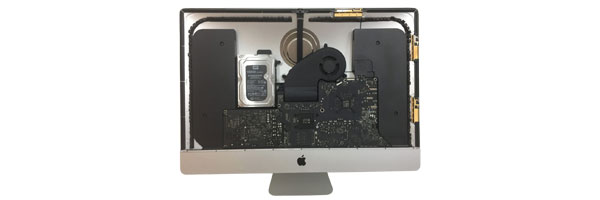
Resolving Storage Failures and Improving System Performance
When an iMac becomes slow, freezes frequently, or struggles to load macOS, the internal storage device is often the cause. Mechanical hard drives wear down over time, and even solid-state storage can fail or become insufficient for modern workloads.
Storage replacement focuses on restoring reliability while also offering opportunities to significantly improve speed and responsiveness when appropriate.
Indicators That Storage Replacement Is Needed
Extended startup times or delayed app launches
System freezes or repeated spinning cursor behavior
Unusual clicking or grinding sounds from inside the iMac
macOS failing to load or stalling during startup
Disk health warnings or corrupted file reports
Storage space no longer meeting daily usage needs
Addressing storage issues early helps reduce the risk of data loss and broader system instability.
How the Storage Replacement Is Performed
Drive Health Assessment
The existing drive is evaluated to confirm failure, degradation, or capacity limitations and to determine compatibility with replacement options.
Drive Replacement or Upgrade
Depending on the iMac model, the system is fitted with a new hard drive or upgraded to solid-state storage for faster performance and improved reliability. Fusion Drive conversions and SSD-only configurations are handled when supported.
System Installation and Configuration
A compatible version of macOS is installed and configured to ensure stable operation and optimal performance.
Data Handling Options
When the original drive is readable, files and user data can be transferred to the new storage. If the drive has failed, recovery options may be evaluated separately.
Final Validation
Boot behavior, storage performance, and system stability are verified before return.
Storage Options Available
High-capacity traditional hard drives
Solid-state drives for faster boot and load times
NVMe-based storage where model support allows
Hybrid or converted configurations depending on system design
Recommendations are made based on usage needs, system compatibility, and long-term reliability.
Supported iMac Models
iMac 21.5-inch and 27-inch models (2012–2020)
iMac Retina 4K and 5K
iMac Pro
Intel-based iMac systems
Apple Silicon iMacs evaluated individually due to limited internal upgrade paths
Each model is serviced according to its specific internal design.
Service Area and Availability
iMac storage replacement services are available throughout Miami-Dade County, including Downtown Miami, Coral Gables, Brickell, Doral, Kendall, Pinecrest, Aventura, Homestead, and surrounding communities.
Arrangements for system transport can be discussed when scheduling service.
Request iMac Storage Service
If your iMac is experiencing storage-related issues or no longer meets your performance needs, you can request an evaluation using the contact us page. Providing details about symptoms and model information helps determine the most appropriate solution.
© 2011-2026 Computer Repair Miamis . All Rights Reserved.


