
MacBook Pro Trackpad Repair and Replacement in Miami
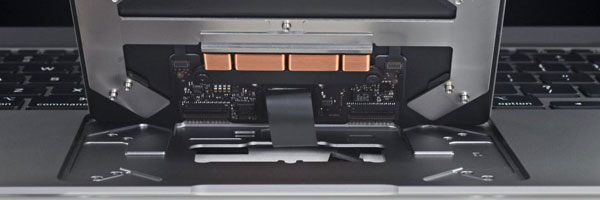
Precision Input Diagnostics and Trackpad Repair
The trackpad is a core input component on a MacBook Pro. When it becomes unresponsive, erratic, or physically misaligned, basic navigation and productivity are immediately affected. Trackpad failures can originate from mechanical wear, internal cable damage, battery expansion, or electrical faults on the input circuit.
This service focuses on restoring accurate tracking, click response, and pressure sensitivity without unnecessary part replacement.
Common Trackpad Problems Addressed
Trackpad does not register clicks or gestures
Cursor movement jumps or freezes
False clicks or dragging without input
Trackpad surface feels raised or uneven
Force Touch pressure no longer responds
Trackpad stops working after liquid exposure
Trackpad failure caused by battery swelling
Some symptoms may appear software-related but are often linked to underlying hardware conditions.
Trackpad Diagnostic Approach
Proper diagnosis is essential before any repair. Evaluation includes:
Trackpad surface and mechanical inspection
Flex cable and connector testing
Input sensor and pressure detection analysis
Battery expansion assessment
Logic board input signal verification
This ensures the issue is accurately isolated before corrective work begins.
Trackpad Repair and Replacement Methods
Trackpad Component Replacement
When the trackpad assembly is damaged or internally compromised, replacement is performed using model-specific components to maintain native responsiveness.
Internal Connector and Signal Repair
Loose or damaged input connectors are repaired to restore consistent communication between the trackpad and logic board.
Battery-Related Trackpad Resolution
If battery expansion is affecting trackpad function, corrective action is taken to prevent recurring failure.
Post-Repair Calibration and Testing
After repair, gesture accuracy, pressure sensitivity, click depth, and cursor stability are verified under real-use conditions.
Supported MacBook Pro Models
Intel-based MacBook Pro systems
Apple Silicon MacBook Pro models
Force Touch and non-Force Touch designs
13-inch, 14-inch, 15-inch, and 16-inch variants
Retina and Touch Bar configurations
Each repair is matched to the specific trackpad architecture used by the model.
Request Trackpad Repair Assistance
If your MacBook Pro trackpad is interfering with normal use, you can request an evaluation through the contact us page. Describing the behavior and when it began helps determine the appropriate repair path.
© 2011-2026 Computer Repair Miamis . All Rights Reserved.


