
• Home |
  • SITEMAP
Computer Repair Miamis logo
  • DESKTOP
    • Desktop Data Recovery
  • LAPTOP
    • LAPTOP DATA RECOVERY
  • MAC REPAIR
    • MAC DATA RECOVERY
    • iPHONE
  • Services
  • Areas we Serve
  • BLOG
  • CONTACT US
    • SITEMAP
    • FREE DELIVERY
  • Home
  • » Tech Knowledge »

RAM compatibility and Network cards.
RAM compatibility and Network cards.

Understanding RAM Compatibility

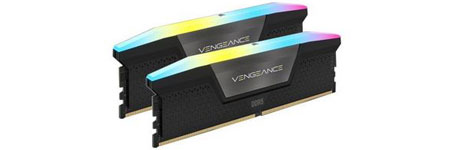
When purchasing RAM, ensuring compatibility with your system is crucial. Different versions of DDR RAM (DDR, DDR2, DDR3, DDR4, and DDR5) exist, each with unique configurations. These versions are not interchangeable. For instance, if your computer has DDR3 slots, only DDR3 RAM modules will be compatible.

RAM sticks are available in two primary forms:

  • DIMM (Dual Inline Memory Module): Used in desktop computers.
  • SODIMM (Small Outline DIMM): Used in laptops.

A lesser-known RAM type is Rambus (RDRAM), which features a distinctive metal covering that acts as a heat sink.

Error Detection and Correction in RAM

  • Parity RAM: Includes an extra bit per byte to detect errors but increases cost.
  • Non-Parity RAM: Uses only eight bits per byte, making it more affordable but unable to detect errors.
  • ECC (Error Correction Code) RAM: Can detect and correct memory errors, commonly used in high-end servers.
  • Non-ECC RAM: Lacks error correction capabilities and is cheaper, making it ideal for desktop systems.

Most operating systems and applications include built-in routines for basic memory error detection and correction, reducing the necessity of ECC RAM for consumer use.

Optimizing RAM Performance

  • Dual-Channel RAM: Enhances performance by combining two memory slots into one bank. To maximize efficiency, always install matched RAM sticks in the same-colored slots.
  • Clock Speed Considerations: RAM modules operate at the lowest speed among installed sticks. For example, if you install a 1600 MHz module alongside a 1333 MHz module, both will run at 1333 MHz.
  • DDR Naming Convention: The standard naming format for DDR memory includes the type (DDR, DDR2, DDR3, etc.) followed by its speed, such as DDR3-1600.

Network Interface Cards (NICs) and Expansion Cards

Expansion cards enhance computer functionality. A sound card, for example, improves audio quality over onboard sound systems. When installing an expansion card, always disable conflicting onboard devices to prevent system conflicts.

Common Issues with Expansion Cards

  • Graphics Card Power Requirements: PCIe graphics cards require power from a 6-pin or 8-pin power connector. Inadequate power supply can lead to performance issues.
  • Driver Updates: If a new expansion card malfunctions, check the manufacturer’s website for updated drivers.

Network Interface Cards (NICs)

A NIC (Network Interface Card) is often added to replace a failed onboard NIC or to upgrade network speed. If your system’s built-in NIC supports 100 Mbps but your network runs at 1,000 Mbps, adding a higher-speed NIC improves connectivity.

Multi-Homed Computers and NIC Teaming

  • A multi-homed computer has two NICs, allowing it to connect to multiple networks.
  • NIC Teaming (Link Aggregation): Uses two NICs to boost data throughput and improve redundancy.
  • Most NICs utilize 8P8C connectors (commonly mistaken as RJ-45) with twisted-pair cables but may support other connection types.

Conclusion

Understanding RAM compatibility and expansion card installation is essential for optimal computer performance. When upgrading RAM, always ensure compatibility with your system’s motherboard, and for network upgrades, consider NIC specifications to maximize connectivity speed.

  • 2, 2013
  • Category: Tech Knowledge
  • Tags: how to fix a computer
  • Comments Off on RAM compatibility and Network cards.
  • « Previous
  • Next »

Sidebar Stories

  • MacBook Pro Battery Replacement May 27, 2025
  • MacBook Pro Logic Board Repairs May 26, 2025
  • MacBook Pro Liquid Damage Repairs May 25, 2025
  • MacBook Pro Video Repairs May 23, 2025
  • MacBook Pro Hard Drive Replacement May 21, 2025
  • MacBook Pro Trackpad Repairs May 20, 2025
  • MacBook Pro DC Jack Repairs May 19, 2025
  • MacBook Pro WiFi Repairs May 18, 2025
  • MacBook Pro Data Recovery May 17, 2025
  • MacBook Pro Data Transfer May 16, 2025
  • MacBook Pro Software Configuration May 15, 2025
  • Laptop Repair Diagnostic May 14, 2025
  • Laptop Cleaning and Maintenance May 12, 2025
  • Laptop Battery Replacement May 9, 2025
  • Laptop Screen Repairs May 8, 2025
  • Laptop Hard Drive Replacement May 6, 2025
  • Laptop Keyboard Repairs May 4, 2025
  • Laptop Liquid Damage Repairs May 2, 2025
  • Laptop Motherboard Repairs Apr 30, 2025
  • Laptop DC Jack Repairs Apr 29, 2025
  • Laptop Video Repairs Apr 26, 2025
  • Laptop Trackpad Repairs Apr 22, 2025
  • MacBook Pro Repair Diagnostic Apr 24, 2025
  • Laptop Trackpad Repairs Apr 23, 2025
  • MacBook Pro Cleaning and Maintenance Apr 22, 2025
  • MacBook Pro Screen Repairs Apr 21, 2025
  • MacBook Pro Keyboard Replacement Apr 20, 2025
  • Laptop Software Configuration Apr 19, 2025
  • Laptop Data Recovery Apr 17, 2025
  • iMac Diagnostic & Repair Services – Get Answers Fast Apr 16, 2025
  • iMac Cleaning and Maintenance Apr 15, 2025
  • Detecting if your gaming laptop requires air cleaning maintenance April 12, 2025
  • The Best Practices for Building a Custom Gaming PC April 11, 2025
  • Mistakes to avoid when trying to repair a liquid damaged pc April 10, 2025
  • Enhance the performance of your gaming PC for streaming April 8, 2025
  • Identifying the causes of slow laptop performance April 6, 2025
  • Home Services April 4, 2025
  • Wiring Installation April 3, 2025
  • Security Cameras April 1, 2025
  • Wired and Wireless Network Mar 28, 2025
  • Data Recovery Mar 27, 2025
  • Game Console Diagnostic Mar 25, 2025
  • Drone Repairs Mar 23, 2025
  • Microsoldering Services Mar 22, 2025
  • Tablet Diagnostic Mar 21, 2025
  • iPhone Repairs Mar 20, 2025
  • Mac Pro Power Supply Repairs Mar 18, 2025
  • Mac Pro Data Transfer Mar 15, 2025
  • Mac Pro Data Recovery Mar 14, 2025
  • Mac Pro Software Configuration Mar 13, 2025
  • Mac Pro Logic Board Repairs Mar 12, 2025
  • Mac Pro Hardware Upgrades Mar 10, 2025
  • Mac Pro Video Repairs Mar 8, 2025
  • Mac Pro Hard Drive Replacement Mar 7, 2025
  • Mac Pro Cleaning and Maintenance Mar 4, 2025
  • Mac Pro Repair Diagnostic Mar 3, 2025
  • Desktop Computer Data Recovery Mar 2, 2025
  • Desktop Computer Data Transfer Mar 1, 2025
  • Desktop Computer Software Configuration Mar 1, 2025
  • Desktop Computer Hardware Upgrades Feb 27, 2025
  • Desktop Computer Motherboard Repairs Feb 25, 2025
  • Desktop Computer Hard Drive Replacement Feb 24, 2025
  • Desktop Computer Cleaning and Maintenance Feb 23, 2025
  • Desktop Computer Repair Diagnostic Feb 21, 2025
  • All-in-One Computer Data Recovery Feb 18, 2025
  • All-in-One Computer Data Transfer Feb 17, 2025
  • All-in-One Software Configuration Feb 16, 2025
  • All-in-One Computer Hardware Upgrades Feb 14, 2025
  • All-in-One Computer Motherboard Repairs Feb 13, 2025
  • All-in-One Computer Hard Drive Replacement Feb 11, 2025
  • All-in-One Computer Power Supply Repairs Feb 10, 2025
  • All-in-One Computer Cleaning and Maintenance Feb 9, 2025
  • All-in-One Computer Repair Diagnostic Feb 7, 2025
  • MacBook Air Data Transfer Feb 5, 2025
  • MacBook Air Software Configuration Feb 4, 2025
  • MacBook Air Data Recovery Feb 3, 2025
  • MacBook Air Liquid Damage Repairs Feb 2, 2025
  • MacBook Air Logic Board Repairs Feb 1, 2025
  • MacBook Air Trackpad Repairs Jan 25, 2025
  • MacBook Air DC Jack Repairs Jan 24, 2025
  • MacBook Air Hard Drive Replacement Jan 23, 2025
  • MacBook Air Battery Replacement Jan 22, 2025
  • MacBook Air Keyboard Repairs Jan 21, 2025
  • MacBook Air Screen Repairs Jan 20, 2025
  • MacBook Air Cleaning and Maintenance Jan 19, 2025
  • MacBook Air Repair Diagnostic Jan 15, 2025
  • iMac Data Recovery Jan 14, 2025
  • iMac Data Transfer Jan 13, 2025
  • iMac Software Configuration Jan 11, 2025
  • iMac Logic Board Repair Jan 10, 2025
  • iMac Video Repair Jan 8, 2025
  • iMac Screen Repairs Jan 5, 2025
  • iMac Power Supply Repair Jan 2, 2025
  • iMac Hard Drive Replacement Jan 2, 2025
  • iMac Hardware Upgrades Jan 2, 2025

Frequently Served Cities

  • West Miami
  • Key Biscayne
  • Indian Creek
  • Cutler Bay
  • Miami Gardens
  • Kendall
  • Palmetto Bay
  • North Bay Village
  • Bal Harbour
  • Homestead

Primary Service Zones

  • Miami
  • Miami Springs
  • South Miami
  • Pinecrest
  • Doral
  • Coral Gables
  • Sweetwater
  • North Miami Beach
  • Edgewater Miami
  • Downtown Miami

Popular Service Regions

  • Brickell Miami
  • Medley
  • Hialeah
  • Opa Locka
  • Midtown Miami
  • Virginia Gardens
  • North Miami
  • Miami Beach
  • Miami Shores
  • Miami Lakes

Fast, affordable Computer Repair Near You in Miami

Free pickup and delivery available for Miami residents. Call (305) 600-4217

Serving Miami residents with reliable PC and Mac repair

© 2011-2026 Computer Repair Miamis . All Rights Reserved.

  • Twitter
  • Facebook
  • Vimeo
Pinterest Tumblr Instagram